
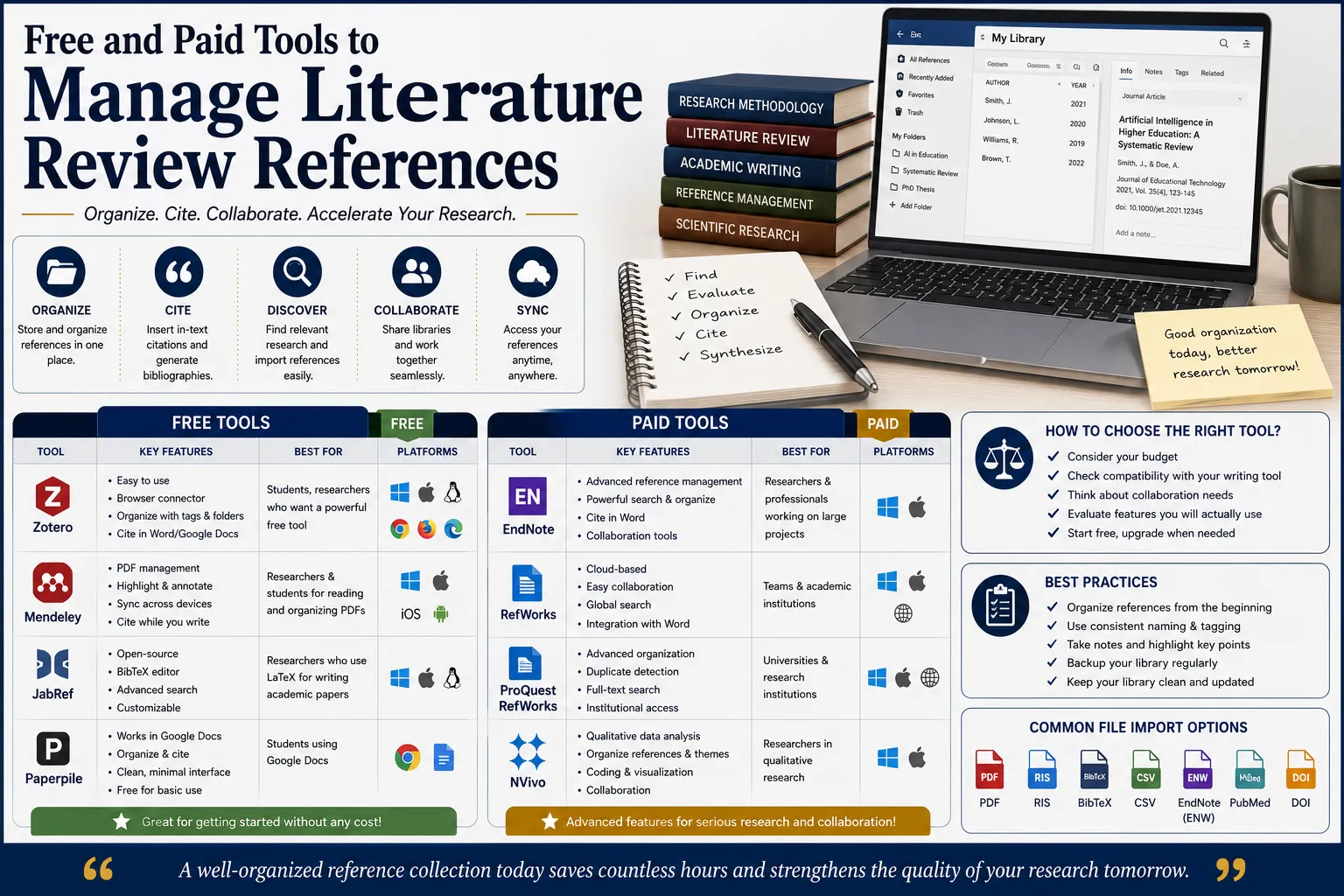
If you're three months into your literature review and still copy-pasting citations by hand into a Word document, you're setting yourself up for a painful few years. Free and paid tools to manage literature review references exist precisely to solve this problem — they capture your sources, store your PDFs, format your in-text citations automatically, and generate a complete bibliography in whatever style your university requires, all without you retyping a single reference.
This guide compares the tools that actually matter for a thesis-length literature review — what's free, what's worth paying for, and which tool fits which kind of scholar. We've grounded this in current 2026 pricing, features, and the patterns we see across thesis writers ThesisLikho supports through the literature review stage.
Why a Reference Manager Isn't Optional for a Thesis
A thesis literature review typically draws on anywhere from fifty to several hundred sources, and manually tracking citation details, formatting requirements, and page numbers across that many references is not just tedious — it's a near-guaranteed source of errors that surface at the worst possible time, usually during final formatting checks before submission. A reference manager solves three problems at once: it captures bibliographic metadata automatically when you find a source, it stores and organizes your PDFs alongside your notes, and it generates correctly formatted in-text citations and bibliographies in whatever citation style your thesis requires — APA, MLA, Chicago, IEEE, Harvard, or any of thousands of journal-specific variants.
Choosing the wrong tool at the start of your PhD, or choosing none at all, can cost you days of reformatting citations later — a problem entirely avoidable by setting up a reference manager before you read your first source, not after your literature review chapter is already drafted.
What a Reference Manager Actually Does
Every reference manager on this list handles the same core workflow, though with different strengths:
- Capturing references — importing bibliographic details directly from a database, journal website, or PDF, usually via a browser extension
- Organizing your library — sorting references into folders, collections, or tags by theme, chapter, or project
- Storing and annotating PDFs — keeping the full-text source attached to its reference entry, often with highlighting and note-taking built in
- Inserting citations while writing — a plugin for Word or Google Docs that lets you insert a properly formatted in-text citation without leaving your document
- Generating a bibliography — automatically compiling and formatting your full reference list in your required citation style, updating instantly if you add or remove sources
The tools differ mainly in cost, platform support, citation style coverage, and how well they integrate with your specific writing environment — which is exactly what determines which one is right for you.
Zotero: The Default Choice for Most Scholars
Zotero is free, open-source, and developed by a non-profit rather than a commercial academic publisher — a distinction that matters more than it might seem, since it means your reference library isn't tied to a vendor's continued goodwill or pricing decisions. It offers unlimited local storage on your own computer, with 300MB of free cloud storage for syncing across devices (expandable with paid storage tiers if needed), support for more than 10,000 citation styles through the Citation Style Language system, and browser-based capture that pulls bibliographic data directly from journal databases and library catalogs with a single click.
Zotero integrates cleanly with both Microsoft Word and Google Docs, which makes it particularly useful for scholars who draft collaboratively with a supervisor in Google Docs before finalizing in Word. Because your library is stored in an open, non-proprietary format, it can also be exported and migrated freely if you ever want to switch tools later — something several paid, closed-format tools don't make easy.
For most Indian PhD scholars starting a thesis in 2026, Zotero is the sensible starting point: free, actively maintained, and capable of handling everything a single-author thesis literature review requires.
Mendeley: Free, But Under Elsevier
Mendeley offers a free tier with 2GB of cloud storage, solid PDF annotation tools, and a "Suggest" feature that recommends related papers based on your existing library — genuinely useful during the early, exploratory phase of a literature review. It was acquired by Elsevier in 2013, and its ownership by a major academic publisher has been a point of concern for some researchers, since features have reportedly been adjusted or restricted over time compared to its earlier independent years.
Mendeley's Google Docs integration is widely reported as unreliable, and its citation style library, while extensive, is somewhat smaller than Zotero's. It remains a reasonable choice if your research group or lab already standardizes on it for shared library collaboration, or if you specifically value its built-in PDF annotation and paper-recommendation features — but for a scholar starting fresh with no existing institutional pull toward Mendeley, Zotero is generally the stronger free option in 2026.
EndNote: The Institutional Standard
EndNote is the most established paid reference manager, typically priced around $249 to $275 per year (or available through many university-wide institutional licenses at no direct cost to the scholar). It offers roughly 7,000 citation styles, deep integration with Microsoft Word through its "Cite While You Write" plugin, and strong capabilities for managing very large reference libraries without performance slowdown — useful for scholars working with genuinely enormous source collections, such as multi-year systematic reviews.
EndNote has no native Google Docs support, which is a meaningful limitation for scholars who collaborate with supervisors in real time through Google Docs. Its cost is also difficult to justify for an individual PhD scholar unless your university provides it as part of an institutional subscription — check with your library before assuming you need to pay for it yourself, since many Indian universities do include EndNote access in their library resources.
Paperpile: Best for Google Docs Users
Paperpile is a cloud-based reference manager priced at roughly $2.99 per month, built specifically around a Google Docs and Chrome workflow. It offers live, inline citation insertion directly in Google Docs that updates automatically as your document changes, strong PDF management with papers stored inside your Google Drive, and support for around 8,000 citation styles.
Its main limitation is the lack of a native Microsoft Word plugin — Paperpile is genuinely built for scholars who draft primarily in Google Docs rather than Word. If your university requires final submission in Word format, you'll need to export your bibliography and adjust formatting at that stage, which is a manageable extra step but worth knowing about before committing to the tool for an entire thesis.
RefWorks: The Institution-Licensed Option
RefWorks is a cloud-based reference manager typically provided through university-wide subscriptions rather than purchased individually — its pricing isn't published publicly and is generally negotiated at the institutional level. It supports collaborative shared libraries with notes tied to specific references, making it a reasonable fit for research groups working within the same university.
Its most significant limitation is that it's web-only, with no dedicated offline desktop application, and access is tied to your institutional affiliation — meaning you can lose access to your own reference library if you graduate or leave the institution providing your subscription, unless you export your data beforehand. If your university offers RefWorks and expects you to use it, it's a solid choice; it's not generally worth seeking out independently if your institution doesn't already provide it.
Citavi: Reference Management Plus Knowledge Organization
Citavi combines standard reference management with task planning, note organization, and quotation collection, making it more of a full research-workflow tool than a pure citation manager. Pricing starts around $79 for individual use, scaling up significantly for team or business licenses. It's particularly popular in Windows- and Word-heavy academic environments, especially in parts of Europe, and now operates under Lumivero (the same company that owns NVivo and ATLAS.ti).
Citavi is worth considering if you want a single tool that manages not just citations but also your reading tasks and thematic notes in one place — though for scholars who already use a separate note-taking or qualitative analysis tool, the added cost may not be justified purely for reference management.
JabRef: The LaTeX Specialist
JabRef is free and open-source, built specifically around BibTeX and LaTeX workflows. If your thesis is being typeset in LaTeX rather than Word or Google Docs — common in engineering, computer science, and some quantitative disciplines — JabRef (or Zotero with the Better BibTeX plugin) is generally the more natural fit than any of the Word-centric tools above.
For most management, humanities, and social science theses written in Word or Google Docs, JabRef isn't the strongest general-purpose choice, but it's worth knowing about specifically if your department's formatting requirements are LaTeX-based.
Understanding Citation Styles Before You Choose a Tool
Every reference manager on this list supports multiple citation styles, but it's worth understanding what you're actually choosing between before you set a default:
- APA (American Psychological Association) — the most common style in management, psychology, education, and social sciences generally; uses author-date in-text citations.
- MLA (Modern Language Association) — common in humanities and literature disciplines; uses author-page in-text citations rather than dates.
- Chicago — offers both a notes-and-bibliography format (common in history) and an author-date format (common in social sciences); check which variant your department expects, since they format very differently.
- Harvard — widely used across UK and Commonwealth universities, including many Indian institutions; author-date in-text style similar to APA but with its own specific formatting rules.
- IEEE — standard for engineering, computer science, and technical disciplines; uses numbered in-text citations corresponding to a numbered reference list, rather than author names.
- Vancouver — common in medical and life sciences research; also numbered, but with different formatting conventions from IEEE.
Indian universities frequently specify APA or a Harvard-style variant for management and social science theses, though requirements vary meaningfully by department and even by individual supervisor, so confirm the exact style — including edition number, since APA 6th and APA 7th differ in several formatting details — before setting your reference manager's default style. All of the tools covered in this guide support thousands of style variants through either the Citation Style Language (CSL) system (Zotero, Paperpile) or proprietary style files (EndNote, Mendeley), so switching between them is a matter of selecting the right file rather than manually reformatting anything.
Free vs Paid: What You're Actually Paying For
The honest answer for most thesis writers in 2026 is that free tools — specifically Zotero — now cover the vast majority of what a single-author literature review actually needs: unlimited citation styles, reliable Word and Google Docs integration, browser-based capture, and enough free storage for typical PDF collections. Paid tools generally earn their cost through one of three things: deeper institutional integration and support (EndNote, RefWorks), a more polished workflow for a specific writing environment (Paperpile for Google Docs), or additional project and knowledge-management features beyond pure citation handling (Citavi).
If your university already provides free institutional access to EndNote or RefWorks through your library, that access is worth using — there's little reason to pay separately for a tool your institution already covers. If it doesn't, starting with Zotero and only upgrading to a paid tool if you hit a specific, concrete limitation is the more sensible default for most scholars.
Choosing the Right Tool for Your Thesis
- Writing primarily in Word, no institutional license provided — Zotero.
- Writing primarily in Google Docs with your supervisor — Zotero (via its Google Docs connector) or Paperpile if you want the more polished, purpose-built integration.
- Your university provides free EndNote or RefWorks access — use what's provided rather than paying separately.
- Working in LaTeX — JabRef, or Zotero with the Better BibTeX plugin.
- Want reference management plus task and note organization in one tool — Citavi.
- Collaborating with a research lab that already standardizes on a specific tool — match your lab's existing choice rather than introducing a second system, even if it isn't your personal first preference.
Setting Up Your Reference Manager the Right Way
- Install the tool and its browser extension before you start your literature search, not after — retroactively adding sources you've already read is far more time-consuming than capturing them as you go.
- Create a folder or collection structure early, organized either by thesis chapter, theme, or methodology type, so your library stays navigable as it grows past a hundred entries.
- Set your citation style once, at the start, matching your university's required format exactly — switching styles later is usually painless technically, but worth confirming before you've written hundreds of citations.
- Attach the full-text PDF to every reference, not just the bibliographic details, so you can search and annotate the actual source later without hunting it down again.
- Use tags or notes fields for your own analytical reactions as you read, not just bibliographic metadata — this pays off enormously when you move into the thematic synthesis and analysis stage of writing.
- Back up or sync your library regularly, especially if you're using a tool with limited free cloud storage, so a lost laptop doesn't mean a lost reference library.
For guidance on the next stage — turning your organized reference library into a literature review that argues rather than lists — see our related guide, how to critically analyze sources instead of just summarizing them.
Real Thesis Example
A scholar working on a literature review covering roughly 180 sources across four themes started her PhD without any reference manager, tracking citations manually in a spreadsheet. By month four, she discovered several duplicate entries with inconsistent formatting and had lost track of which sources she'd already read versus only skimmed. She migrated her existing sources into Zotero, using its "duplicate items" detection feature to clean up her spreadsheet-era records, then set up a folder structure matching her four thematic areas. Going forward, she captured every new source directly through Zotero's browser connector, attaching PDFs and adding her own analytical notes to each entry's notes field as she read. When her supervisor requested a style change from APA to a specific journal's custom format ahead of a conference submission, the entire 180-source bibliography reformatted automatically in under a minute — a task that would have taken days to redo manually.
Common Mistakes When Managing References
- Starting your literature search before setting up a reference manager, then trying to retroactively add dozens or hundreds of sources later.
- Mixing manual citations with reference-manager citations in the same document, which creates formatting inconsistencies that are painful to untangle before submission.
- Not attaching PDFs to reference entries, leaving you to hunt down the original source again later when you need to quote or re-check a detail.
- Ignoring duplicate detection, especially common when importing references from multiple databases that index the same paper.
- Choosing a tool based on what a friend or forum recommends rather than what fits your actual writing environment (Word vs Google Docs vs LaTeX).
- Not confirming your university's exact citation style requirements early, then discovering late in the process that your thesis needs a specific formatting variant your chosen style doesn't quite match.
- Relying on a tool with limited free storage without a backup plan, risking data loss if a device fails or an account issue arises.
- Switching tools mid-thesis without exporting properly, which can scramble notes, tags, and PDF attachments if not done carefully through a standard export format like BibTeX or RIS.
- Assuming your citation style default is correct without checking the edition or variant. APA 6th and APA 7th, or Chicago's notes-and-bibliography versus author-date formats, look similar at a glance but format very differently — confirm the exact version your department expects before your bibliography grows to hundreds of entries.
- Never testing the Word or Google Docs plugin until the final week. Citation plugins occasionally conflict with specific software versions or document settings; testing early, on a short sample document, avoids discovering a compatibility issue right before a submission deadline.
Reference Manager Setup Checklist
Before your literature review search begins in earnest, confirm you have:
- A reference manager installed with its browser capture extension active
- A folder or collection structure matching your thesis chapters or themes
- Your university's required citation style confirmed and set as default
- A Word or Google Docs plugin installed and tested with a sample citation
- A plan for attaching PDFs to every reference as you capture it
- A backup or sync strategy appropriate to your tool's storage limits
- Duplicate-detection checked periodically as your library grows
- A consistent tagging or notes system for capturing your own analytical reactions while reading
How Long Does It Take to Complete a Thesis Using This Approach?
Setting up a reference manager properly takes no more than a few hours at the very start of your literature review, and this upfront investment typically saves several days to weeks of manual reformatting and citation-chasing later in the thesis process — most acutely felt during final submission formatting, when citation errors are both easiest to introduce and most costly to catch late.
Is Professional Help Available for Free and Paid Tools to Manage Literature Review References?
Yes — many thesis writers work with academic mentors or research consultancies to set up their reference library correctly from the start, migrate messy or inconsistent existing citations, and troubleshoot formatting issues before submission deadlines. ThesisLikho's PhD-qualified research experts have supported thesis writers through exactly this stage, helping ensure reference libraries are clean, properly attributed, and formatted precisely to each university's required citation style — all while keeping the underlying research entirely your own. Explore ThesisLikho's thesis writing services for one-on-one guidance.
FAQs
What is free and paid tools to manage literature review references?
These are software tools — such as Zotero, Mendeley, EndNote, and Paperpile — that capture bibliographic details, store and organize PDFs, and automatically generate correctly formatted in-text citations and bibliographies for a thesis literature review, saving scholars from manually tracking and formatting hundreds of sources by hand.
How long does it take to complete a thesis using this approach?
Setting up a reference manager takes just a few hours at the start of your literature review, but it typically saves days to weeks of reformatting and citation-tracking work later, particularly during final submission preparation.
Is professional help available for free and paid tools to manage literature review references?
Yes. Research consultancies and academic mentors, including ThesisLikho's PhD-qualified experts, help scholars set up and clean reference libraries and resolve citation formatting issues while preserving full research originality.
Why does free and paid tools to manage literature review references matter?
Because manually tracking citations across a thesis-length literature review is both time-consuming and error-prone, and citation mistakes are exactly the kind of easily-avoidable issue that can delay submission or draw unnecessary scrutiny during formatting checks.
How does free and paid tools to manage literature review references affect a thesis?
The right reference manager shapes how efficiently you can organize, analyze, and cite sources throughout your literature review, and a well-maintained reference library makes both the writing process and any later style or format changes dramatically faster.
Ready to organize your literature review references the right way?
Talk to a Thesis Expert → https://thesislikho.com/writing-services/thesis-writing