
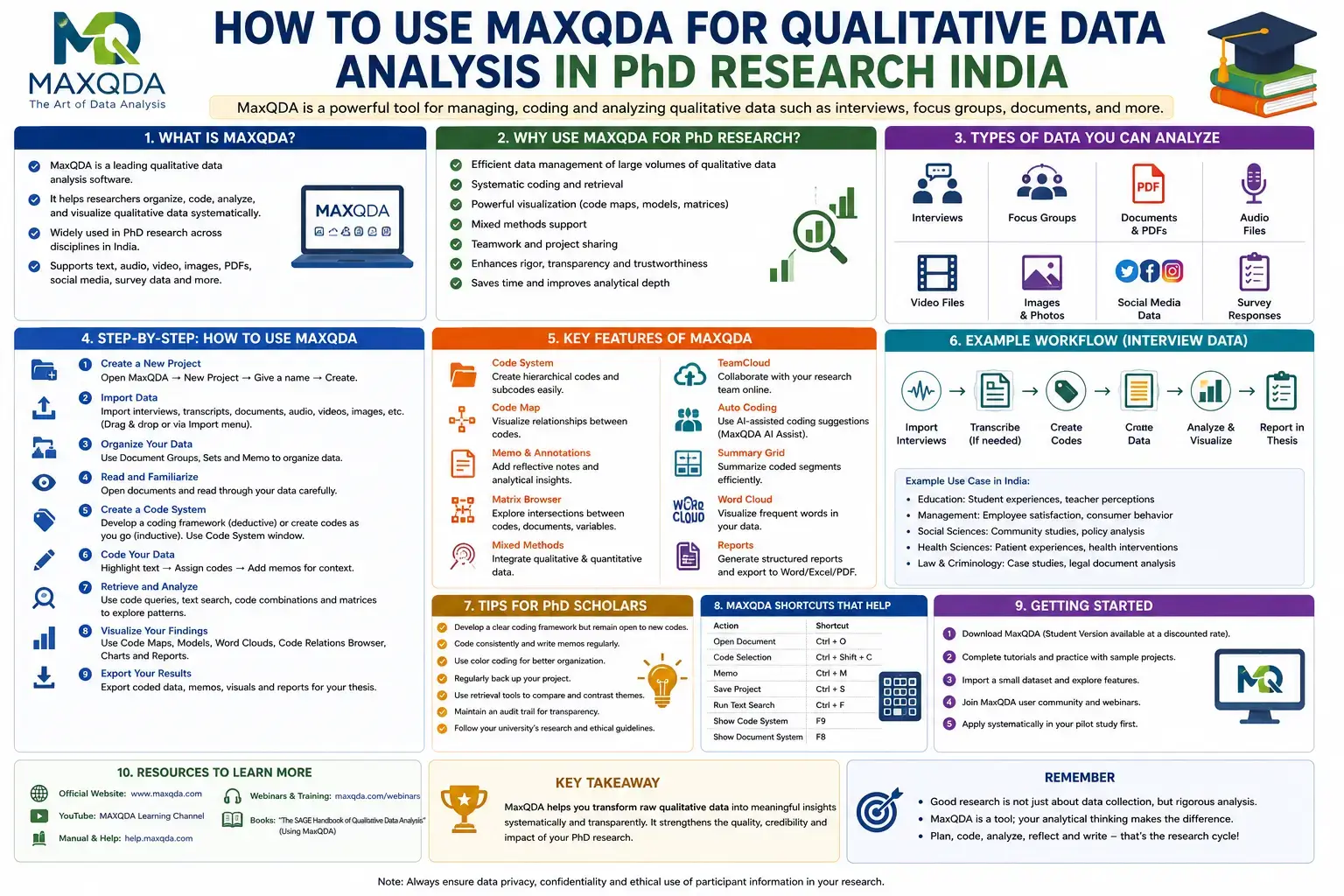
Introduction
Qualitative research plays a crucial role in understanding human experiences, opinions, behaviors, and social phenomena. Whether you are conducting interviews, focus group discussions, open-ended surveys, case studies, or document analysis, managing large volumes of qualitative data manually can be time-consuming and prone to errors. This is where MaxQDA for Qualitative Data Analysis becomes an invaluable tool.
MaxQDA is one of the world's leading qualitative and mixed methods data analysis software programs. It helps researchers organize, code, analyze, visualize, and interpret qualitative data systematically. From social sciences and education to healthcare, psychology, management, and public policy, MaxQDA is widely used by researchers across disciplines.
For PhD scholars in India, learning MaxQDA can significantly improve research efficiency, transparency, and the quality of qualitative analysis. This comprehensive guide explains what MaxQDA is, its features, benefits, workflow, coding process, visualization tools, and best practices for doctoral research.
What Is MaxQDA?
MaxQDA is a Computer-Assisted Qualitative Data Analysis Software (CAQDAS) designed to help researchers analyze qualitative, quantitative, and mixed methods data.
Unlike spreadsheet software, MaxQDA is specifically developed for organizing and interpreting non-numerical data such as:
- Interview transcripts
- Focus group discussions
- Observation notes
- Case study documents
- Open-ended survey responses
- Policy documents
- Articles and reports
- PDFs
- Images
- Audio recordings
- Video files
- Social media data
The software enables researchers to code data, identify patterns, develop themes, visualize relationships, and generate reports without losing the context of the original information.
Why Is MaxQDA Important for PhD Research?
Qualitative research often produces hundreds of pages of transcripts and documents. Managing this information manually becomes increasingly difficult as the volume of data grows.
MaxQDA helps researchers:
- Organize large qualitative datasets.
- Reduce manual coding effort.
- Improve consistency in coding.
- Identify recurring themes.
- Enhance transparency.
- Support evidence-based interpretations.
- Generate visual representations of findings.
- Maintain an audit trail for research credibility.
Many universities and research institutions recommend CAQDAS software because it improves the rigor and reproducibility of qualitative studies.
Key Features of MaxQDA
MaxQDA includes a wide range of tools that simplify qualitative data analysis.
Data Import
Researchers can import multiple file formats, including:
- Word documents
- PDF files
- Excel files
- Text files
- Images
- Audio files
- Video recordings
- Survey data
- Bibliographic data
All files are stored within a single project, making data management easier.
Coding System
Coding is the foundation of qualitative analysis.
MaxQDA allows users to:
- Create hierarchical codes.
- Assign multiple codes to the same text.
- Apply color-coded labels.
- Merge or rename codes.
- Organize codes into categories.
This structured approach helps researchers identify recurring ideas and patterns.
Memo System
Researchers can attach memos to:
- Documents
- Codes
- Segments
- Variables
- Entire projects
Memos are useful for recording observations, interpretations, methodological decisions, and analytical insights during the research process.
Retrieval Functions
MaxQDA allows researchers to retrieve coded segments instantly.
Instead of manually searching hundreds of pages, users can display every passage associated with a selected code, making comparative analysis much faster.
Visualization Tools
The software includes several visualization features, including:
- Code Matrix Browser
- Code Relations Browser
- Word Clouds
- Document Portraits
- Concept Maps
- Code Maps
- Interactive Visual Tools
These visualizations help identify relationships and communicate findings effectively.
Mixed Methods Support
MaxQDA is not limited to qualitative research.
Researchers can combine qualitative coding with quantitative variables, making it suitable for mixed methods research.
Types of Research Supported by MaxQDA
MaxQDA can be used for various research designs, including:
- Phenomenology
- Grounded Theory
- Ethnography
- Case Study Research
- Narrative Research
- Content Analysis
- Thematic Analysis
- Action Research
- Mixed Methods Research
- Policy Analysis
Its flexibility makes it applicable across multiple academic disciplines.
Step-by-Step Guide to Using MaxQDA
Step 1: Create a New Project
Begin by creating a new project and assigning a descriptive name.
Keeping separate projects for different studies helps maintain organization throughout the research process.
Step 2: Import Your Data
Import all relevant research materials into the project.
These may include:
- Interview transcripts
- Focus group discussions
- Observation notes
- Research articles
- PDFs
- Audio recordings
- Images
- Survey responses
Organizing data before coding improves workflow efficiency.
Step 3: Familiarize Yourself with the Interface
MaxQDA consists of several main panels:
- Document System
- Code System
- Document Browser
- Retrieved Segments Window
Understanding these components helps you navigate the software more efficiently.
Step 4: Read the Data
Before coding, carefully read through each document.
This familiarization stage helps identify recurring concepts, patterns, and ideas that may later become codes or themes.
Step 5: Create Initial Codes
Highlight meaningful sections of text and assign descriptive codes.
Examples include:
- Job satisfaction
- Work-life balance
- Leadership
- Employee motivation
- Customer trust
- Digital adoption
Initial coding should remain flexible, allowing new ideas to emerge from the data.
Step 6: Organize Codes
As coding progresses, similar codes can be grouped into broader categories.
For example:
Employee Experience
- Job satisfaction
- Career growth
- Work stress
- Team collaboration
Hierarchical coding improves the organization of complex datasets.
Step 7: Write Analytical Memos
Throughout the coding process, record reflections, emerging patterns, and methodological decisions using memos.
These notes become valuable when interpreting findings and writing the discussion chapter.
Step 8: Retrieve Coded Segments
Once coding is complete, retrieve all text associated with specific codes.
This feature enables researchers to compare responses across participants and identify similarities and differences.
Step 9: Develop Themes
Review related codes and combine them into broader themes.
For example:
Theme: Employee Well-Being
Subthemes:
- Work stress
- Mental health
- Organizational support
- Flexible working
Themes should directly answer the research objectives.
Step 10: Generate Visualizations
Use MaxQDA's visualization tools to explore relationships among codes and themes.
Visual outputs can also be included in research presentations and thesis chapters.
Step 11: Export Results
Export:
- Codebooks
- Coding reports
- Frequency tables
- Retrieved segments
- Visualizations
- Summary tables
These outputs can be incorporated into your thesis or research paper.
Coding in MaxQDA
Coding is the process of assigning labels to meaningful sections of data.
Common coding approaches include:
Open Coding
Identifies initial concepts without predefined categories.
Axial Coding
Groups related codes into broader categories.
Selective Coding
Develops core themes that explain the research findings.
MaxQDA supports all three coding approaches, making it suitable for Grounded Theory and thematic analysis.
Using MaxQDA for Thematic Analysis
Thematic analysis is one of the most common qualitative analysis methods.
The process typically involves:
- Reading transcripts.
- Creating initial codes.
- Reviewing codes.
- Combining codes into themes.
- Refining themes.
- Defining themes.
- Reporting findings.
MaxQDA streamlines each of these steps through its coding and retrieval features.
Visualization Tools in MaxQDA
Visual representations help researchers identify patterns more effectively.
Popular visualization tools include:
Code Matrix Browser
Displays how codes are distributed across documents.
Code Relations Browser
Shows relationships between different codes.
Word Cloud
Highlights frequently occurring words.
Document Portrait
Illustrates the coding distribution within individual documents.
Concept Maps
Visualizes connections among themes and concepts.
These tools improve both analysis and presentation of qualitative findings.
Advantages of Using MaxQDA
Researchers choose MaxQDA because it offers several advantages.
These include:
- User-friendly interface.
- Supports multiple data formats.
- Efficient coding system.
- Powerful visualization tools.
- Excellent document management.
- Strong mixed methods capabilities.
- Comprehensive reporting options.
- Improved research transparency.
- Time-saving workflow.
- Suitable for interdisciplinary research.
Limitations of MaxQDA
Despite its strengths, MaxQDA has some limitations.
These include:
- Requires time to learn.
- Commercial software with licensing costs.
- Interpretation still depends on researcher expertise.
- Large projects may require substantial computing resources.
Understanding these limitations helps researchers plan accordingly.
Best Practices for Using MaxQDA
To maximize the effectiveness of MaxQDA:
- Develop a clear coding framework.
- Keep code names concise and meaningful.
- Update memos regularly.
- Review coding consistency.
- Back up project files frequently.
- Maintain an audit trail.
- Refine themes iteratively.
- Document methodological decisions.
- Verify interpretations against original data.
- Export reports periodically.
Following these practices enhances the credibility of qualitative research.
Common Mistakes to Avoid
Researchers should avoid the following errors:
- Creating too many overlapping codes.
- Using vague code names.
- Ignoring memo writing.
- Failing to review coding consistency.
- Developing themes without sufficient evidence.
- Overlooking contradictory data.
- Not backing up project files.
- Treating software as a substitute for critical thinking.
MaxQDA supports analysis, but thoughtful interpretation remains the researcher's responsibility.
Tips for PhD Students in India
PhD scholars in India can use MaxQDA more effectively by:
- Planning the coding strategy before analysis.
- Organizing documents into logical groups.
- Maintaining consistent coding across researchers if working in teams.
- Using visualizations to strengthen thesis chapters.
- Keeping detailed analytical memos.
- Reviewing coded data regularly.
- Integrating software outputs with theoretical frameworks.
- Following university guidelines for qualitative research reporting.
These practices improve the quality and transparency of doctoral research.
Frequently Asked Questions (FAQs)
What is MaxQDA used for?
MaxQDA is a qualitative and mixed methods data analysis software used to organize, code, analyze, visualize, and interpret research data.
Is MaxQDA suitable for PhD research?
Yes. MaxQDA is widely used by PhD scholars across disciplines for qualitative and mixed methods research.
Can MaxQDA analyze interview transcripts?
Yes. Researchers can import interview transcripts, code responses, retrieve coded segments, and develop themes.
Does MaxQDA support thematic analysis?
Yes. MaxQDA provides comprehensive tools for coding, categorizing, theme development, and visualization, making it highly suitable for thematic analysis.
Can MaxQDA analyze audio and video data?
Yes. MaxQDA allows researchers to import and code audio and video recordings directly within the software.
Is MaxQDA useful for mixed methods research?
Yes. MaxQDA integrates qualitative coding with quantitative variables, making it suitable for mixed methods studies.
Conclusion
MaxQDA for Qualitative Data Analysis is a powerful software solution that helps PhD researchers manage, code, analyze, and interpret qualitative data systematically. Its advanced coding features, visualization tools, memo system, and mixed methods capabilities make it an excellent choice for handling complex research projects.
For PhD students in India, learning MaxQDA can improve research efficiency, enhance analytical rigor, and strengthen the credibility of qualitative findings. By following a structured workflow, maintaining consistent coding practices, and using the software's analytical tools effectively, researchers can produce transparent, well-organized, and high-quality qualitative research suitable for theses and academic publications.
Website: www.thesislikho.com
Call/WhatsApp: +91 96438 02216