
Introduction
Managing references is one of the biggest challenges faced by PhD scholars. A doctoral researcher may read hundreds of journal articles, books, conference papers, theses, reports, and online resources throughout the research journey. Without a proper system for organizing references, researchers can quickly lose track of important sources, create citation errors, and spend countless hours formatting bibliographies.
This is where Mendeley becomes an essential research tool.
Mendeley is one of the world's most popular reference management software platforms, helping researchers collect, organize, annotate, cite, and share academic literature efficiently. Whether you are conducting a literature review, writing a thesis, preparing a journal article, or publishing in a Scopus-indexed journal, Mendeley can significantly improve your research workflow.
For PhD scholars in India and around the world, learning Mendeley is no longer optional—it is a valuable skill that saves time, improves accuracy, and enhances academic productivity.
In this comprehensive guide, you'll learn:
- What Mendeley is
- Why PhD scholars use Mendeley
- Key features of Mendeley
- How to install and set up Mendeley
- How to organize references effectively
- How to use Mendeley with Microsoft Word
- How to generate citations automatically
- Mendeley best practices for literature reviews
- Common mistakes to avoid
- Tips for maximizing research productivity
What Is Mendeley?
Mendeley is a reference management and academic collaboration tool that helps researchers manage scholarly literature and citations.
Developed as a platform for organizing academic documents, Mendeley enables users to:
- Store research papers
- Manage references
- Generate citations
- Create bibliographies
- Annotate PDFs
- Collaborate with other researchers
- Synchronize research libraries across devices
Today, millions of researchers worldwide use Mendeley for academic writing and research management.
Why Is Reference Management Important in PhD Research?
A PhD project often spans several years and involves extensive reading and writing.
Researchers may encounter:
- Hundreds of journal articles
- Numerous books and book chapters
- Conference proceedings
- Government reports
- Websites and databases
- Research datasets
Managing these references manually can lead to:
- Missing citations
- Duplicate references
- Formatting errors
- Increased risk of plagiarism
- Time-consuming bibliography creation
Reference management software helps solve these problems efficiently.
Why Do PhD Scholars Use Mendeley?
Mendeley provides several advantages that make it popular among doctoral researchers.
Saves Time
Automatic citation generation eliminates manual formatting.
Reduces Errors
References remain consistent throughout the document.
Improves Organization
Researchers can store and categorize thousands of papers.
Supports Collaboration
Teams can share references and research materials.
Enhances Literature Reviews
Mendeley simplifies the process of reviewing and organizing academic literature.
Works with Popular Citation Styles
Including:
- APA 7th Edition
- Harvard
- MLA
- IEEE
- Chicago
- Vancouver
Key Features of Mendeley
Understanding Mendeley's features helps researchers use it effectively.
Reference Library
Store all references in a centralized database.
PDF Management
Import and organize PDF research papers.
PDF Annotation
Highlight text and add comments directly to documents.
Citation Generation
Automatically insert citations while writing.
Bibliography Creation
Generate complete reference lists instantly.
Cloud Synchronization
Access your research library from multiple devices.
Research Collaboration
Create shared groups for collaborative projects.
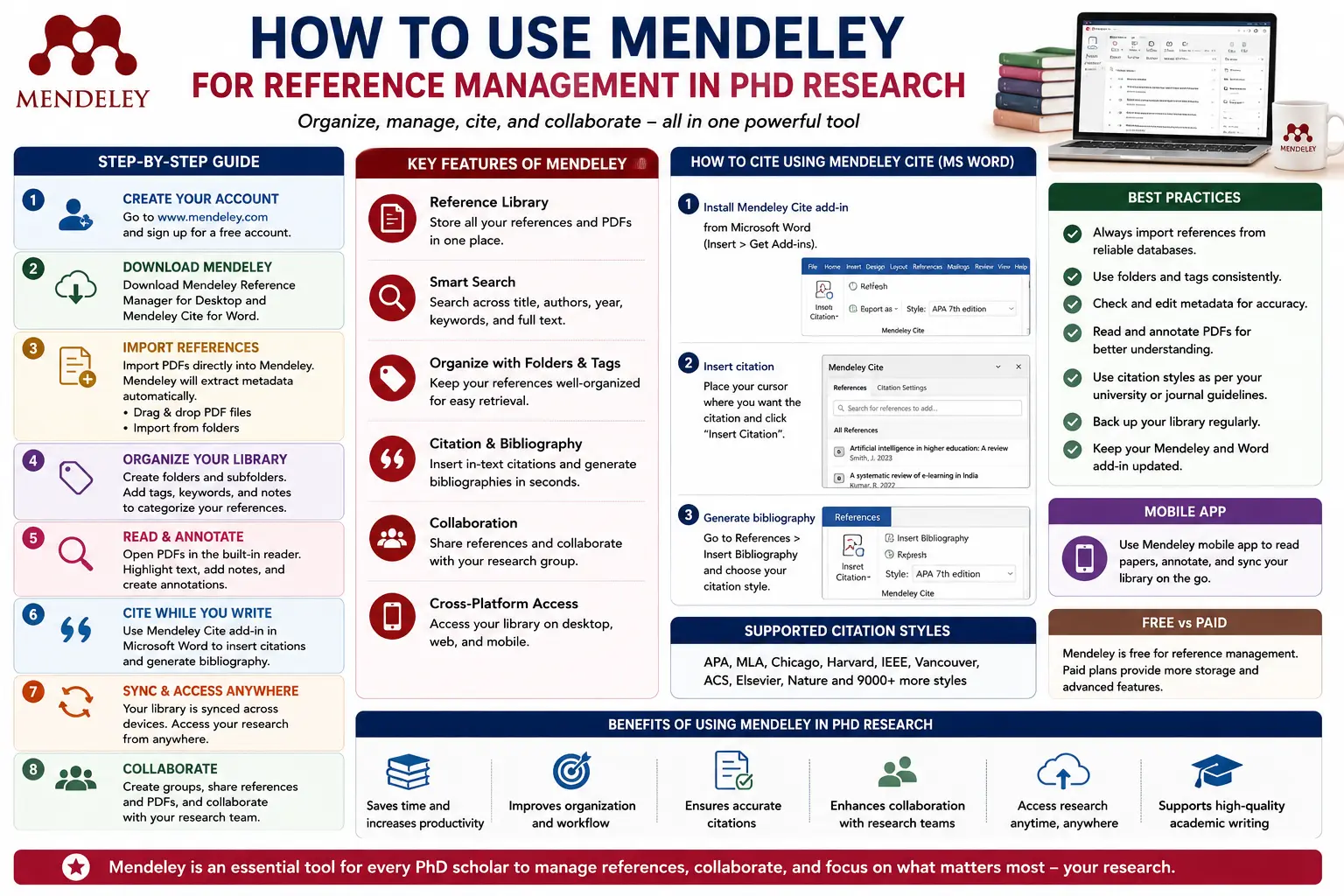
How to Install Mendeley
Getting started with Mendeley is straightforward.
Step 1: Download Mendeley
Visit the official Mendeley website and download:
- Windows version
- macOS version
- Linux version
Install the software following on-screen instructions.
Step 2: Create a Mendeley Account
Register using your email address.
An account enables:
- Cloud backup
- Synchronization
- Collaboration features
Step 3: Install Mendeley Reference Manager
The latest version offers improved performance and integration.
Step 4: Install the Web Importer
The Mendeley Web Importer allows researchers to save references directly from:
- Google Scholar
- PubMed
- ScienceDirect
- Scopus
- Web of Science
Step 5: Install Microsoft Word Plugin
Mendeley integrates directly with Microsoft Word for citation insertion and bibliography generation.
Understanding the Mendeley Interface
The Mendeley dashboard contains several important sections.
Library Panel
Displays folders and collections.
Reference Panel
Shows stored references and documents.
Details Panel
Displays metadata including:
- Author
- Title
- Journal
- Year
- DOI
- Keywords
Search Bar
Quickly locate articles and references.
How to Add References to Mendeley
Mendeley offers multiple methods for importing references.
Method 1: Import Using Web Importer
When viewing an article online:
- Click the Mendeley Web Importer.
- Select the article.
- Save it to your library.
Metadata is imported automatically.
Method 2: Import PDF Files
Drag and drop PDFs into Mendeley.
The software often extracts:
- Author names
- Titles
- Journal information
- Publication year
automatically.
Method 3: Add References Manually
For books or uncommon sources:
- Click "Add Entry Manually."
- Select source type.
- Enter bibliographic information.
Method 4: Import RIS or BibTeX Files
Many databases allow direct export to Mendeley.
Examples:
- Scopus
- Web of Science
- PubMed
Organizing References in Mendeley
Effective organization improves research efficiency.
Create Folders
Example:
PhD Thesis
- Literature Review
- Methodology
- Results
- Discussion
Use Tags
Examples:
- Artificial Intelligence
- Healthcare
- Data Analytics
- Systematic Review
Tags simplify searching.
Add Notes
Researchers can attach notes summarizing key findings.
Example:
"Important framework for conceptual model."
How to Read and Annotate PDFs
One of Mendeley's most useful features is PDF annotation.
Researchers can:
- Highlight important text
- Add comments
- Mark research gaps
- Save observations
This reduces the need for separate note-taking applications.
Using Mendeley for Literature Reviews
A literature review requires careful organization of scholarly evidence.
Mendeley simplifies this process.
Store Articles in One Place
All sources remain accessible within a single library.
Categorize by Theme
Examples:
- Theoretical Studies
- Empirical Research
- Methodological Papers
Record Key Findings
Attach notes to articles immediately after reading.
Track Research Gaps
Use annotations to identify unanswered questions.
How to Insert Citations in Microsoft Word
One of Mendeley's strongest features is Word integration.
Step 1: Open Your Document
Ensure the Mendeley Cite add-in is installed.
Step 2: Place Cursor
Position the cursor where the citation should appear.
Step 3: Open Mendeley Cite
Search for the reference using:
- Author name
- Title
- Keyword
Step 4: Insert Citation
Mendeley automatically formats the citation.
Examples:
APA:
(Sharma, 2024)
IEEE:
[5]
How to Generate a Bibliography Automatically
After inserting citations:
- Open Mendeley Cite.
- Select "Insert Bibliography."
The bibliography is generated automatically.
This saves significant time during thesis writing.
Switching Citation Styles in Mendeley
Researchers often submit papers to journals requiring different citation styles.
Mendeley supports thousands of styles.
Examples:
- APA
- Harvard
- IEEE
- Vancouver
- Chicago
To switch styles:
- Open Citation Style Settings.
- Choose the desired format.
- Update the document.
The entire reference list changes automatically.
Using Mendeley for Systematic Reviews
Systematic reviews often involve hundreds or thousands of records.
Mendeley helps researchers:
- Import search results
- Remove duplicates
- Organize studies
- Store PDFs
- Manage screening notes
This improves transparency and efficiency.
Collaboration Features in Mendeley
Research increasingly involves teamwork.
Mendeley allows users to:
- Create groups
- Share references
- Collaborate on projects
- Exchange research materials
These features are useful for:
- Co-authored papers
- Research teams
- International collaborations
Common Mendeley Mistakes to Avoid
Ignoring Metadata Errors
Always verify imported information.
Incorrect metadata can lead to citation errors.
Poor Library Organization
Use folders and tags consistently.
Not Backing Up Data
Enable synchronization regularly.
Relying Completely on Automation
Review citations before submission.
Keeping Duplicate References
Merge duplicates periodically.
Best Practices for PhD Scholars
Start Early
Begin organizing references from the first day of research.
Create a Consistent Folder Structure
Use clear categories.
Read and Annotate Papers Immediately
Capture insights while they are fresh.
Verify Imported Data
Check authors, titles, and publication years.
Use Notes Extensively
Summarize important findings and methodologies.
Sync Regularly
Protect your library from accidental loss.
Advanced Tips for Research Productivity
Experienced researchers use Mendeley strategically.
Build a Literature Review Database
Store all relevant studies in thematic folders.
Track Influential Papers
Tag landmark studies for quick access.
Maintain Reading Notes
Create summaries for future writing.
Organize References by Research Objectives
This simplifies thesis chapter development.
Use Search Filters
Locate specific references instantly.
When Should You Use Mendeley?
Mendeley is useful for:
- PhD thesis writing
- Dissertation preparation
- Research papers
- Journal articles
- Literature reviews
- Systematic reviews
- Conference papers
- Academic assignments
- Research projects
Any project involving multiple references can benefit from Mendeley.
Future of Reference Management
Research technology continues to evolve.
Modern reference management tools increasingly include:
- AI-powered organization
- Smart PDF analysis
- Enhanced collaboration
- Improved cloud synchronization
- Better research workflows
Mendeley continues to adapt to these trends, making it a valuable long-term tool for researchers.
Conclusion
Mendeley has become one of the most powerful and widely used reference management tools for academic research. Its ability to organize references, manage PDFs, generate citations, create bibliographies, and support collaboration makes it an essential resource for PhD scholars.
For doctoral researchers, mastering Mendeley can dramatically improve productivity, reduce citation errors, and streamline the entire research process. From literature reviews and systematic reviews to thesis writing and journal publication, Mendeley helps scholars focus on what truly matters—conducting high-quality research.
By learning how to organize references effectively, annotate research papers, automate citations, and maintain a structured literature database, PhD scholars can save countless hours while improving the quality and professionalism of their academic work.
Website: www.thesislikho.com
Call/WhatsApp: +91 96438 02216