
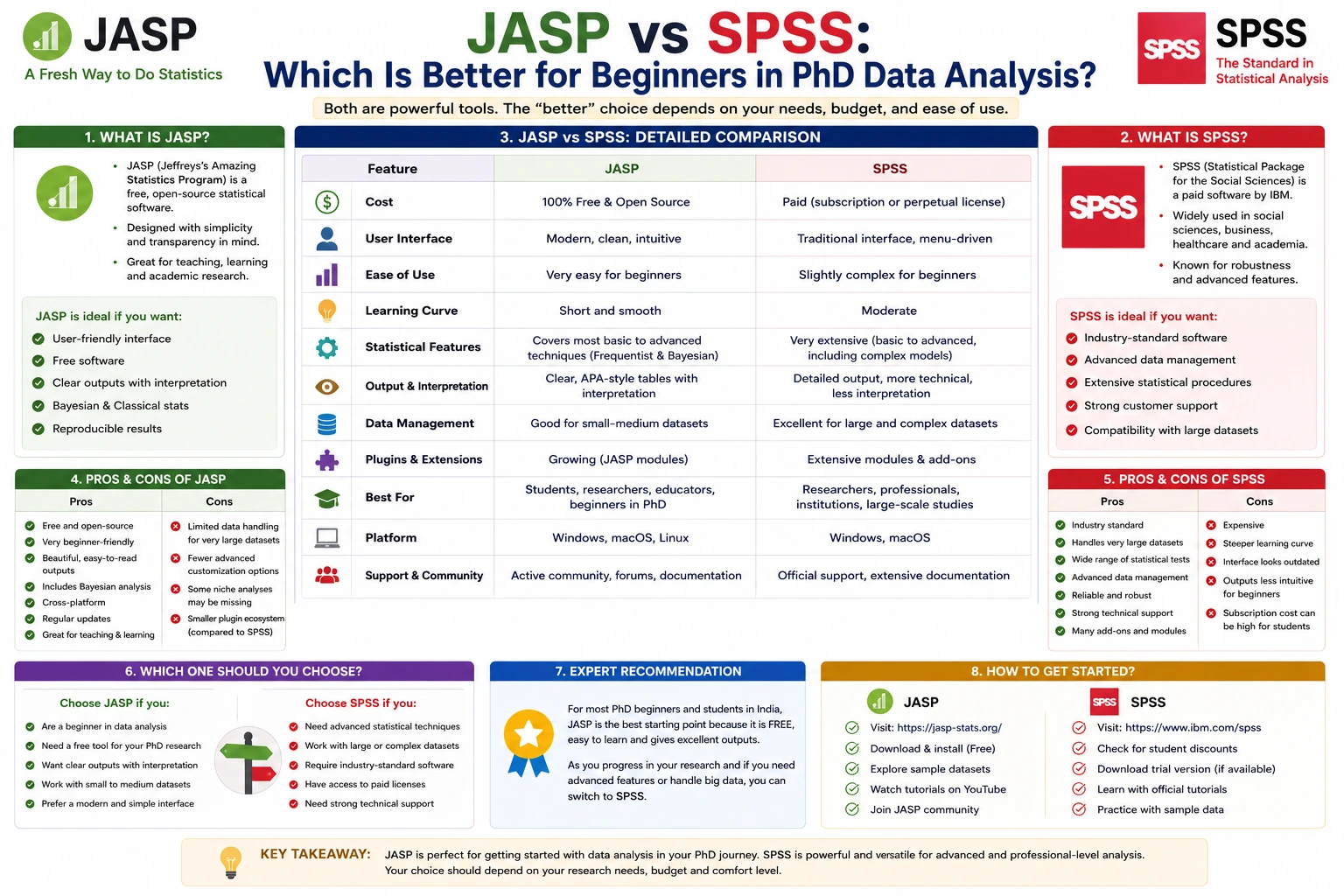
Introduction
Statistical data analysis is an essential part of quantitative research, and choosing the right software can significantly impact the efficiency and accuracy of your work. Among the many statistical software packages available today, JASP and SPSS are two of the most popular choices for students, researchers, and academic institutions.
For PhD scholars in India, selecting the right software often depends on several factors, including ease of use, cost, statistical capabilities, learning curve, institutional support, and research requirements. While SPSS has been a trusted statistical software for decades, JASP has gained popularity as a free, modern, and beginner-friendly alternative.
This comprehensive guide compares JASP vs SPSS across features, usability, pricing, statistical analysis, visualization, advantages, limitations, and suitability for PhD research to help beginners make an informed decision.
What Is JASP?
JASP (Jeffreys's Amazing Statistics Program) is a free, open-source statistical software developed to make statistical analysis easier and more transparent.
It provides a user-friendly graphical interface where researchers can perform statistical analyses without writing programming code. One of its distinguishing features is native support for both frequentist and Bayesian statistical methods.
JASP is widely used in psychology, education, social sciences, business, healthcare, and other research disciplines.
What Is SPSS?
SPSS (Statistical Package for the Social Sciences) is one of the world's most widely used commercial statistical software packages.
Originally developed for social science research, SPSS is now used across diverse fields such as healthcare, economics, marketing, engineering, public health, education, and management.
Its intuitive point-and-click interface, extensive statistical procedures, and institutional acceptance have made it a standard tool in universities and research organizations worldwide.
Why Is Choosing the Right Statistical Software Important?
Selecting suitable statistical software helps researchers:
- Analyze data accurately.
- Save time during analysis.
- Reduce calculation errors.
- Produce professional reports.
- Generate publication-ready tables and charts.
- Improve research quality.
- Support evidence-based conclusions.
For beginners, ease of learning is equally important because statistical concepts are often more challenging than the software itself.
User Interface Comparison
JASP
JASP offers a clean and modern interface designed for beginners.
Features include:
- Ribbon-style menus
- Real-time output updates
- Simple navigation
- Interactive analysis panels
- Publication-ready tables
The interface resembles common office applications, making it easier for new users.
SPSS
SPSS provides a traditional interface consisting of:
- Data View
- Variable View
- Output Viewer
- Syntax Editor
Although slightly less modern, it remains intuitive and familiar to many researchers.
Ease of Learning
For beginners, ease of learning is a major consideration.
JASP
JASP simplifies statistical analysis through:
- Minimal configuration
- Interactive menus
- Automatic output updates
- Easy-to-read statistical results
Researchers can begin analyzing data shortly after installation.
SPSS
SPSS is also beginner-friendly but includes more options and settings.
The larger number of statistical procedures may initially appear overwhelming to new users, although many universities provide training and tutorials.
Statistical Analysis Features
Both software packages support a wide range of statistical techniques.
Descriptive Statistics
Both JASP and SPSS provide:
- Mean
- Median
- Mode
- Standard deviation
- Frequency distributions
- Cross-tabulations
Hypothesis Testing
Both software packages support:
- Independent t-test
- Paired t-test
- One-way ANOVA
- Chi-square test
- Correlation analysis
- Regression analysis
Advanced Statistical Methods
JASP
Supports:
- Bayesian statistics
- Mixed models
- Structural equation modeling (selected modules)
- Meta-analysis
- Reliability analysis
SPSS
Supports:
- Advanced regression
- General linear models
- Mixed models
- Factor analysis
- Cluster analysis
- Survival analysis
- Decision trees
- Time series analysis
- Structural equation modeling (through additional software)
SPSS offers a broader range of advanced procedures.
Bayesian Statistics
One area where JASP stands out is Bayesian analysis.
JASP includes:
- Bayesian t-tests
- Bayesian ANOVA
- Bayesian regression
- Bayesian correlation
- Bayesian contingency tables
SPSS primarily focuses on traditional frequentist statistics and offers limited native Bayesian functionality.
Researchers interested in Bayesian methods often prefer JASP.
Data Management
JASP
JASP supports importing data from:
- Excel
- CSV
- SPSS files
- OpenDocument files
Its data management capabilities are sufficient for most academic research.
SPSS
SPSS supports:
- Excel
- CSV
- SQL databases
- Text files
- SAS
- Stata
- R
- Oracle
- IBM databases
SPSS provides more comprehensive data management options for large and complex datasets.
Data Visualization
Visualizing data improves interpretation and presentation.
JASP
Provides:
- Histograms
- Box plots
- Scatter plots
- Density plots
- Descriptive charts
SPSS
Provides:
- Bar charts
- Pie charts
- Histograms
- Box plots
- Scatter plots
- Line graphs
- Error bars
- Custom chart builder
SPSS offers greater flexibility for customized visualizations.
Reporting Results
Both software packages generate publication-ready statistical outputs.
JASP automatically formats tables according to common academic standards, making them easy to include in theses and journal articles.
SPSS provides detailed output that can be customized and exported to Word, Excel, and PDF.
Cost Comparison
JASP
- Completely free.
- Open-source.
- No subscription required.
- Suitable for students and independent researchers.
SPSS
- Commercial software.
- Requires purchasing a license or institutional access.
- Student versions may have limited functionality.
- Many universities provide access through campus licenses.
For students with limited budgets, JASP offers a significant financial advantage.
Advantages of JASP
JASP offers several benefits for beginners.
These include:
- Free to use.
- Open-source.
- Modern interface.
- Easy installation.
- Built-in Bayesian statistics.
- Automatic result updates.
- Publication-ready tables.
- Active development community.
- Suitable for teaching statistics.
- Lightweight software.
Advantages of SPSS
SPSS remains one of the most widely used statistical software packages because it offers:
- Extensive statistical procedures.
- Excellent data management.
- Strong institutional acceptance.
- Comprehensive documentation.
- Large user community.
- Integration with databases.
- Professional technical support.
- Reliable performance.
- Suitable for complex research projects.
- Widely accepted by journals.
Limitations of JASP
Despite its strengths, JASP has certain limitations.
These include:
- Fewer advanced statistical procedures.
- Limited database connectivity.
- Smaller user community.
- Less enterprise support.
- Fewer customization options.
Researchers conducting highly specialized analyses may eventually require more advanced software.
Limitations of SPSS
SPSS also has some disadvantages.
These include:
- Expensive licensing.
- Closed-source software.
- Some advanced modules require additional purchases.
- Traditional interface.
- Higher system requirements for large projects.
The cost is often the biggest challenge for students.
JASP vs SPSS for Different Research Fields
Social Sciences
Both software packages perform well for survey-based and behavioral research.
Psychology
JASP is particularly popular because of its Bayesian analysis capabilities.
Education
Both are suitable for educational research involving descriptive and inferential statistics.
Business and Management
SPSS remains widely used for market research, organizational studies, and business analytics.
Healthcare
SPSS is commonly used in medical and public health research because of its advanced analytical capabilities.
Which Software Is Better for Beginners?
For beginners, several factors should be considered.
Choose JASP if you:
- Want free software.
- Are learning statistics for the first time.
- Need Bayesian analysis.
- Prefer a simple interface.
- Have limited financial resources.
Choose SPSS if you:
- Have university access.
- Need advanced statistical analyses.
- Work with large datasets.
- Require institutional compatibility.
- Plan to use software commonly accepted by employers.
Best Practices for Learning JASP or SPSS
To learn either software effectively:
- Understand statistical concepts before using the software.
- Practice with sample datasets.
- Learn descriptive statistics first.
- Gradually explore inferential tests.
- Interpret results instead of simply generating outputs.
- Keep notes on statistical procedures.
- Verify assumptions before performing tests.
- Practice regularly using real research data.
Building statistical knowledge is more important than memorizing software menus.
Common Mistakes to Avoid
Many beginners make similar mistakes regardless of the software they use.
Avoid:
- Selecting inappropriate statistical tests.
- Ignoring assumptions.
- Misinterpreting p-values.
- Overlooking missing data.
- Reporting only significant findings.
- Confusing correlation with causation.
- Failing to explain statistical outputs.
- Relying entirely on software without understanding the methodology.
Statistical software assists analysis but does not replace statistical reasoning.
Tips for PhD Students in India
For doctoral researchers in India:
- Start with the software recommended by your university or supervisor.
- Learn the statistical concepts before learning the interface.
- Use practice datasets to build confidence.
- Save analysis outputs regularly.
- Document every analytical step for reproducibility.
- Cross-check results before reporting.
- Keep your software updated.
- Combine statistical analysis with sound research methodology.
These practices improve research quality and ensure reliable results.
Frequently Asked Questions (FAQs)
Is JASP free?
Yes. JASP is completely free and open-source, making it an excellent choice for students and researchers.
Is SPSS better than JASP?
SPSS offers more advanced statistical procedures and broader institutional acceptance, while JASP is easier for beginners and includes built-in Bayesian analysis.
Which software is easier to learn?
JASP is generally considered easier because of its modern interface and simplified workflow.
Can JASP open SPSS files?
Yes. JASP can import SPSS (.sav) files directly.
Which software is better for PhD research?
Both are suitable. The better choice depends on your research objectives, statistical requirements, institutional support, and budget.
Is SPSS still widely used?
Yes. SPSS remains one of the most widely used statistical software packages in universities, research institutions, healthcare, business, and government organizations.
Conclusion
The comparison of JASP vs SPSS shows that both software packages are powerful tools for quantitative data analysis, but they serve different needs. JASP is an excellent option for beginners, students, and researchers seeking a free, intuitive, and modern platform with strong Bayesian analysis capabilities. Its ease of use and cost-free access make it particularly attractive for PhD scholars starting their research journey.
SPSS, on the other hand, continues to be the industry standard for academic and professional research due to its extensive statistical procedures, advanced data management, and widespread institutional acceptance. Although it requires a paid license, it remains the preferred choice for complex analyses and large-scale research projects.
For most beginners in PhD research, JASP is an ideal starting point, especially if budget is a concern. As research requirements become more advanced, learning SPSS can further expand analytical capabilities and enhance career opportunities in academia, industry, and research organizations.
Website: www.thesislikho.com
Call/WhatsApp: +91 96438 02216