
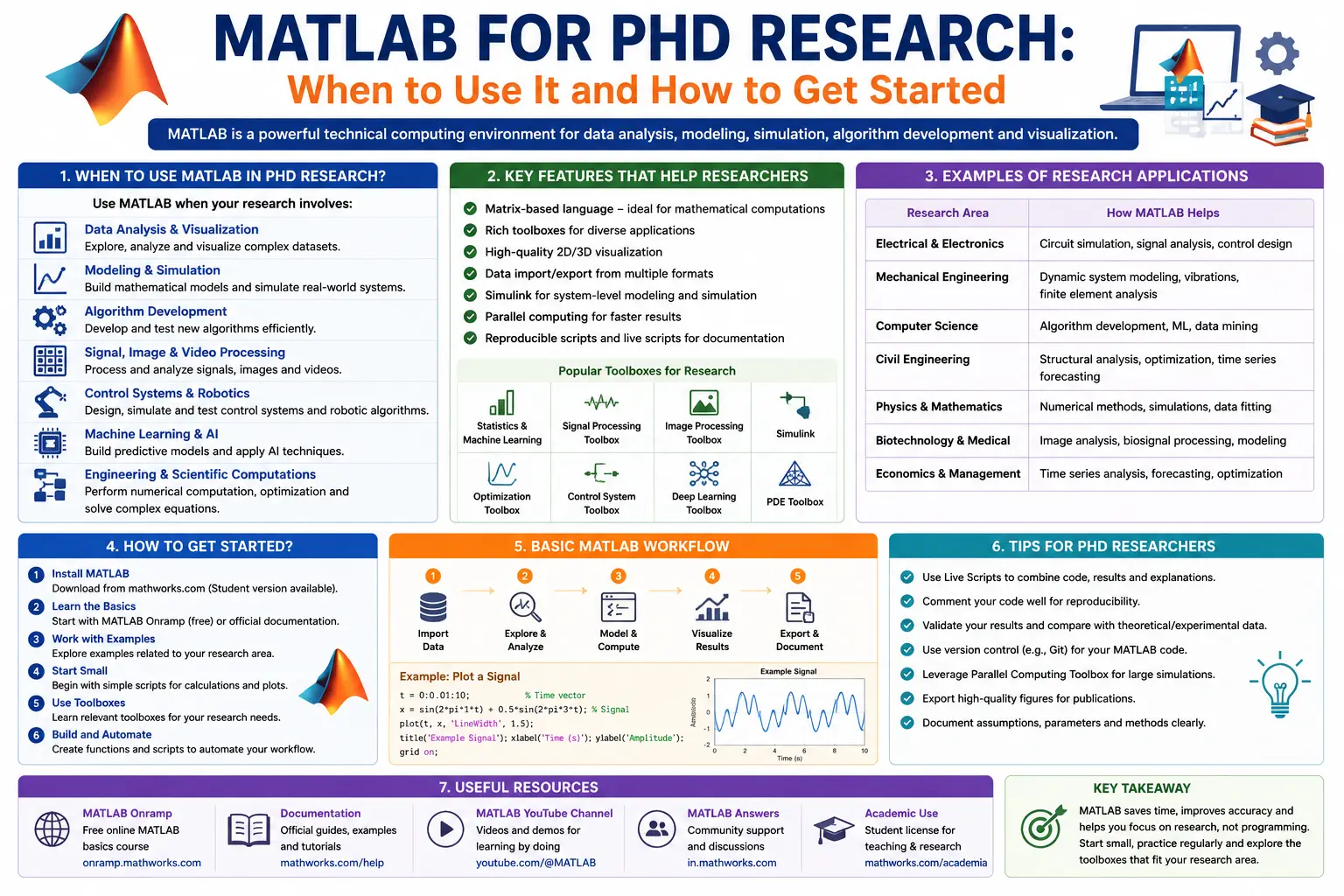
MATLAB is one of the most powerful software platforms used in academic research, engineering, and scientific computing. Whether you're analyzing complex datasets, building mathematical models, processing images, or simulating real-world systems, MATLAB provides an integrated environment that simplifies advanced research tasks.
For PhD scholars, selecting the right analytical tool is essential for producing accurate, reproducible, and high-quality research. While statistical software such as SPSS, STATA, and R are commonly used for data analysis, MATLAB stands out for its strengths in numerical computing, simulation, algorithm development, signal processing, optimization, and machine learning.
Today, universities, research laboratories, government agencies, and technology companies across India and around the world use MATLAB for cutting-edge research in engineering, computer science, physics, economics, finance, healthcare, robotics, and artificial intelligence.
If you're considering MATLAB for your doctoral research, this comprehensive guide will explain what MATLAB is, when you should use it, its advantages and limitations, key applications, and how to get started—even if you have no prior programming experience.
What Is MATLAB?
MATLAB stands for MATrix LABoratory. It is a high-level programming language and interactive computing environment developed by MathWorks for numerical computation, data analysis, algorithm development, visualization, and simulation.
Unlike spreadsheet software or traditional statistical packages, MATLAB is specifically designed to work efficiently with matrices, vectors, mathematical equations, and large datasets.
Researchers use MATLAB to:
- Analyze experimental data
- Develop mathematical models
- Simulate engineering systems
- Design algorithms
- Visualize research findings
- Build machine learning models
- Process images and signals
Its extensive collection of built-in functions and specialized toolboxes makes it a preferred platform for computational research.
Why Is MATLAB Popular Among PhD Researchers?
Many doctoral research projects involve solving mathematical problems that go beyond standard statistical analysis. MATLAB provides an environment where researchers can perform sophisticated numerical computations with relatively simple code.
Some reasons why MATLAB is widely used include:
- Easy-to-read programming syntax.
- Excellent numerical accuracy.
- Powerful matrix operations.
- Interactive visualization tools.
- Extensive scientific toolboxes.
- Reliable simulation capabilities.
- Strong industry and academic acceptance.
Because of these strengths, MATLAB is frequently recommended for STEM disciplines and computational research.
Key Features of MATLAB
MATLAB offers a wide range of features that support every stage of the research process.
1. Numerical Computing
MATLAB excels at performing complex mathematical calculations.
Researchers can solve:
- Linear algebra problems
- Differential equations
- Optimization problems
- Matrix operations
- Numerical integration
- Eigenvalue analysis
These capabilities are particularly valuable in engineering, physics, and applied mathematics.
2. Data Analysis
MATLAB provides tools for importing, cleaning, organizing, and analyzing datasets.
Researchers can:
- Import Excel and CSV files
- Handle missing values
- Filter observations
- Compute descriptive statistics
- Perform regression analysis
- Analyze time series data
This makes MATLAB suitable for experimental and observational research.
3. Data Visualization
Clear visualizations are essential for communicating research findings.
MATLAB supports high-quality charts such as:
- Scatter plots
- Line graphs
- Histograms
- Surface plots
- Heat maps
- Contour plots
- 3D visualizations
These figures can be customized for journal publications and conference presentations.
4. Simulation and Modeling
Simulation is one of MATLAB's greatest strengths.
Researchers use it to model:
- Mechanical systems
- Electrical circuits
- Chemical processes
- Population dynamics
- Climate systems
- Financial markets
By simulating real-world scenarios, researchers can test hypotheses without costly physical experiments.
5. Machine Learning and Artificial Intelligence
MATLAB includes tools for developing predictive models using machine learning techniques.
Supported methods include:
- Classification
- Regression
- Clustering
- Neural networks
- Deep learning
- Reinforcement learning
These tools are increasingly valuable in modern interdisciplinary research.
6. Signal Processing
Signal processing researchers use MATLAB for:
- Noise reduction
- Frequency analysis
- Audio processing
- Biomedical signal analysis
- Wireless communication research
Its specialized Signal Processing Toolbox simplifies these tasks.
7. Image Processing
Researchers working with images can use MATLAB for:
- Image enhancement
- Object detection
- Pattern recognition
- Medical image analysis
- Satellite image processing
- Computer vision applications
The Image Processing Toolbox provides numerous built-in algorithms.
When Should You Use MATLAB for PhD Research?
MATLAB is not the ideal solution for every research project. It is particularly valuable when your study requires advanced mathematical computation or simulation.
Use MATLAB for Engineering Research
Engineering researchers frequently rely on MATLAB for:
- Control systems
- Robotics
- Mechanical design
- Electrical engineering
- Civil engineering simulations
- Aerospace modeling
Use MATLAB for Scientific Computing
Researchers in physics, chemistry, and applied mathematics use MATLAB to solve computationally intensive mathematical problems.
Examples include:
- Partial differential equations
- Numerical optimization
- Fluid dynamics
- Quantum mechanics simulations
Use MATLAB for Signal Processing
If your research involves:
- ECG signals
- EEG analysis
- Speech processing
- Radar systems
- Wireless communications
MATLAB is among the most widely used platforms.
Use MATLAB for Image Processing
Researchers studying:
- Medical imaging
- Remote sensing
- Agriculture
- Satellite imagery
- Computer vision
can leverage MATLAB's advanced image analysis capabilities.
Use MATLAB for Machine Learning
MATLAB supports many AI techniques, making it useful for:
- Predictive modeling
- Classification problems
- Deep learning
- Pattern recognition
- Intelligent automation
Although Python is more dominant in large-scale AI development, MATLAB remains popular for research prototyping and engineering applications.
Research Fields That Commonly Use MATLAB
MATLAB is widely used across numerous disciplines.
These include:
- Mechanical Engineering
- Electrical Engineering
- Electronics and Communication
- Aerospace Engineering
- Civil Engineering
- Computer Science
- Artificial Intelligence
- Robotics
- Mathematics
- Physics
- Chemistry
- Biomedical Engineering
- Environmental Engineering
- Finance
- Economics
- Data Science
Many Indian Institutes of Technology (IITs), National Institutes of Technology (NITs), and research universities include MATLAB in postgraduate curricula and doctoral research projects.
Advantages of MATLAB for Research
User-Friendly Programming Language
MATLAB's syntax is relatively easy to understand, making it suitable for beginners.
Simple mathematical expressions can often be written almost exactly as they appear in textbooks.
Extensive Toolboxes
MATLAB includes specialized toolboxes for:
- Statistics
- Machine Learning
- Optimization
- Deep Learning
- Image Processing
- Signal Processing
- Control Systems
- Financial Modeling
These toolboxes reduce development time by providing ready-to-use algorithms.
Excellent Visualization
MATLAB produces high-quality graphics suitable for academic publications.
Researchers can customize colors, labels, legends, fonts, and layouts with ease.
Strong Mathematical Capabilities
Few software platforms match MATLAB's capabilities for numerical analysis and mathematical modeling.
This makes it ideal for computationally intensive research.
Reliable Documentation
MathWorks provides extensive documentation, tutorials, examples, and community forums, making it easier for researchers to learn new techniques and troubleshoot problems.
Limitations of MATLAB
Despite its strengths, MATLAB has some drawbacks.
Commercial Licensing
MATLAB is proprietary software and requires a paid license. Fortunately, many universities provide institutional access for students and faculty.
Limited Open-Source Community Compared with Python
While MATLAB has an active user community, Python's open-source ecosystem offers a broader range of community-developed packages.
Less Common in Some Social Science Fields
Researchers in management, psychology, sociology, and education often prefer SPSS, STATA, or R for traditional statistical analyses.
Dependency on Toolboxes
Many advanced features require additional toolboxes, which may increase licensing costs if they are not included in your institution's subscription.
How to Get Started with MATLAB
If you're new to MATLAB, follow these steps to build a strong foundation.
Step 1: Learn the MATLAB Interface
Familiarize yourself with:
- Command Window
- Workspace
- Current Folder
- Editor
- Figure Window
Understanding the interface will make navigation much easier.
Step 2: Practice Basic Commands
Start with simple tasks such as:
- Creating variables
- Performing arithmetic operations
- Working with vectors and matrices
- Writing basic scripts
- Using built-in functions
Mastering these basics prepares you for more advanced programming.
Step 3: Import and Explore Data
Practice importing datasets from Excel or CSV files.
Learn how to:
- Inspect variables
- Summarize data
- Identify missing values
- Visualize distributions
Step 4: Learn Matrix Operations
Since MATLAB is designed around matrices, understanding matrix manipulation is essential.
Topics include:
- Matrix addition and multiplication
- Matrix inversion
- Eigenvalues and eigenvectors
- Solving systems of equations
Step 5: Explore Toolboxes
Depending on your research field, familiarize yourself with relevant toolboxes, such as:
- Statistics and Machine Learning Toolbox
- Optimization Toolbox
- Image Processing Toolbox
- Signal Processing Toolbox
- Deep Learning Toolbox
- Control System Toolbox
Step 6: Build Small Research Projects
Apply your skills to simple tasks before tackling your thesis.
Examples include:
- Plotting experimental data.
- Performing regression analysis.
- Simulating physical systems.
- Classifying datasets using machine learning.
Hands-on practice accelerates learning.
Best Practices for Using MATLAB in Academic Research
To maximize the value of MATLAB, follow these recommendations:
- Write Modular Code: Organize scripts into reusable functions.
- Comment Your Programs: Explain complex sections to improve readability.
- Use Version Control: Track changes with Git or similar tools.
- Validate Results: Compare outputs with theoretical expectations or published benchmarks.
- Save Scripts and Data: Maintain reproducible workflows.
- Optimize Performance: Use vectorized operations instead of unnecessary loops where appropriate.
- Document Software Versions: Record the MATLAB release and toolbox versions used in your research.
Common Mistakes to Avoid
Many new MATLAB users make avoidable errors, such as:
- Ignoring matrix dimensions.
- Writing inefficient loops instead of leveraging vectorized operations.
- Not commenting code.
- Overlooking missing or inconsistent data.
- Relying on default settings without understanding underlying assumptions.
- Forgetting to save scripts and backup projects.
- Using specialized toolboxes without verifying that they are appropriate for the research question.
Learning from these common mistakes can improve both coding efficiency and research quality.
Frequently Asked Questions (FAQs)
Is MATLAB suitable for beginners?
Yes. MATLAB's intuitive syntax and interactive environment make it accessible to beginners, particularly those with backgrounds in mathematics, engineering, or science.
Is MATLAB better than Python?
Neither is universally better. MATLAB excels in numerical computing, simulations, and engineering research, while Python offers greater flexibility, a vast open-source ecosystem, and broader adoption in AI and data science.
Can MATLAB perform statistical analysis?
Yes. MATLAB supports descriptive statistics, regression analysis, hypothesis testing, multivariate methods, time series analysis, and machine learning through dedicated toolboxes.
Is MATLAB free for students?
MATLAB is commercial software, but many universities provide institutional licenses. Some educational licenses are also available at reduced cost.
Which research fields use MATLAB the most?
MATLAB is widely used in engineering, robotics, computer science, applied mathematics, physics, biomedical engineering, finance, signal processing, image analysis, and scientific computing.
Conclusion
MATLAB remains one of the most powerful and trusted platforms for computational and engineering research. Its strengths in numerical computing, matrix operations, simulation, visualization, and algorithm development make it an invaluable tool for PhD scholars working on mathematically intensive research problems.
Whether you're modeling complex engineering systems, analyzing biomedical signals, processing satellite imagery, or developing machine learning models, MATLAB provides a reliable and well-documented environment that supports rigorous, reproducible research. While its commercial licensing and specialized toolboxes may be considerations, the software's extensive capabilities and widespread acceptance in academia and industry continue to make it a preferred choice for many researchers.
For PhD scholars beginning their research journey, investing time in learning MATLAB can significantly enhance analytical capabilities, streamline research workflows, and improve the quality of scientific outputs. By mastering the fundamentals, exploring relevant toolboxes, and applying best coding practices, you can leverage MATLAB to conduct sophisticated analyses and produce impactful research that meets the highest academic standards.
Website: www.thesislikho.com
Call/WhatsApp: +91 96438 02216