
Introduction
Most researchers know the frustration. You type your research topic into Google Scholar, get 847,000 results, open the first five papers, and realise none of them are quite what you need. So you try again with slightly different words. You get different results, still not ideal. An hour later, you have seventeen browser tabs open, a growing sense of panic, and no clear sense of whether you have found the most important literature in your field — or just the most findable.
Searching academic databases is a skill. Like all skills, it can be learned, practised, and significantly improved. Yet very few universities teach it systematically, and very few PhD supervisors explain it beyond recommending a handful of databases and wishing you luck.
This guide changes that. Whether you are writing a dissertation literature review, a systematic review for a journal article, or a research proposal, this step-by-step guide will show you how to search academic databases strategically, efficiently, and thoroughly — so you find what you actually need, not just what happens to appear first.
Why Effective Database Searching Matters
Your literature review is not just a summary of what others have written. It is your argument that you understand the field, that you have identified the gaps your research will fill, and that your work is grounded in rigorous engagement with existing scholarship.
A poorly conducted database search produces a biased, incomplete literature review. You may miss seminal papers that every examiner will expect you to cite. You may over-represent one school of thought and ignore another. You may cite outdated findings without knowing that newer research has superseded them.
Examiners, peer reviewers, and journal editors are experienced readers. They notice gaps. A literature review that cites extensively in one area but overlooks a well-known body of work in a related area signals that the search was ad hoc rather than systematic.
Investing time in learning how to search properly at the beginning of your research saves significant rework later.
Step 1: Understand the Landscape of Academic Databases
Not all databases are the same. They differ in disciplinary coverage, indexing criteria, access models, and search functionality. The first decision you must make is which databases to search — and that depends on your discipline.
Multidisciplinary Databases
Google Scholar — Free, vast, and accessible. Indexes journal articles, theses, conference papers, preprints, and grey literature. Excellent for a broad initial sweep and for finding citations. Limitations: inconsistent quality control, limited filtering options, and it surfaces results by citation count rather than relevance to your specific question.
Scopus — Published by Elsevier, Scopus is one of the largest abstract and citation databases of peer-reviewed literature. Covers science, technology, medicine, social sciences, and arts and humanities. Available through most Indian university library subscriptions. Excellent for citation tracking, author searches, and journal-level filtering.
Web of Science — Published by Clarivate, Web of Science is the gold standard for citation analysis and impact factor tracking. Particularly strong in natural sciences, engineering, and social sciences. Also available through many Indian institutional subscriptions. Preferred by researchers conducting systematic reviews.
JSTOR — An archive of academic journals, books, and primary sources across disciplines. Particularly strong in humanities and social sciences. Older content is freely accessible; newer content requires institutional access.
Discipline-Specific Databases
PubMed / MEDLINE — The essential database for medicine, public health, nursing, pharmacy, and biomedical sciences. Free to access. Run by the US National Library of Medicine. Uses Medical Subject Headings (MeSH) for controlled vocabulary searching.
PsycINFO — Published by the American Psychological Association. Comprehensive coverage of psychology, psychiatry, neuroscience, and behavioural sciences. Available through institutional subscriptions.
ERIC — Education Resources Information Center. The standard database for education research. Free to access at eric.ed.gov. Essential for researchers in education, pedagogy, curriculum studies, and teacher training.
EconLit — Published by the American Economic Association. Covers economics, econometrics, finance, and related fields.
MLA International Bibliography — Essential for literary studies, linguistics, and modern languages. Indexes journals, books, and dissertations in humanities disciplines.
Shodhganga — India's national repository of theses and dissertations, hosted by INFLIBNET. Essential for Indian researchers wanting to review existing Indian doctoral work on their topic. Free to access.
IndMED / NLM India — For Indian biomedical and health research literature.
ProQuest Dissertations & Theses — Global repository of doctoral dissertations and master's theses. Useful for understanding how similar questions have been studied previously.
Preprint Servers
arXiv — Physics, mathematics, computer science, economics. Preprints before peer review.
SSRN — Social sciences, economics, law. Working papers and preprints.
bioRxiv / medRxiv — Life sciences and medicine. Increasingly used post-pandemic for rapid dissemination.
Preprints are not peer-reviewed and should be cited with appropriate caution, but they are important for accessing cutting-edge research before formal publication.
Step 2: Define Your Search Concepts Before You Touch a Database
The most common mistake researchers make is opening a database and typing a phrase before they have clearly defined what they are searching for. Effective searching begins on paper, not on a screen.
Decompose Your Research Question
Take your research question and break it into its core conceptual components. A useful framework is PICO (used in health sciences) or its derivatives:
- P — Population or Problem (who or what are you studying?)
- I — Intervention or Interest (what is the phenomenon, intervention, or issue?)
- C — Comparison (what are you comparing it to, if anything?)
- O — Outcome (what result or effect are you examining?)
For non-health disciplines, a simpler framework works: identify the two to four key concepts in your research question. Each concept becomes a search block.
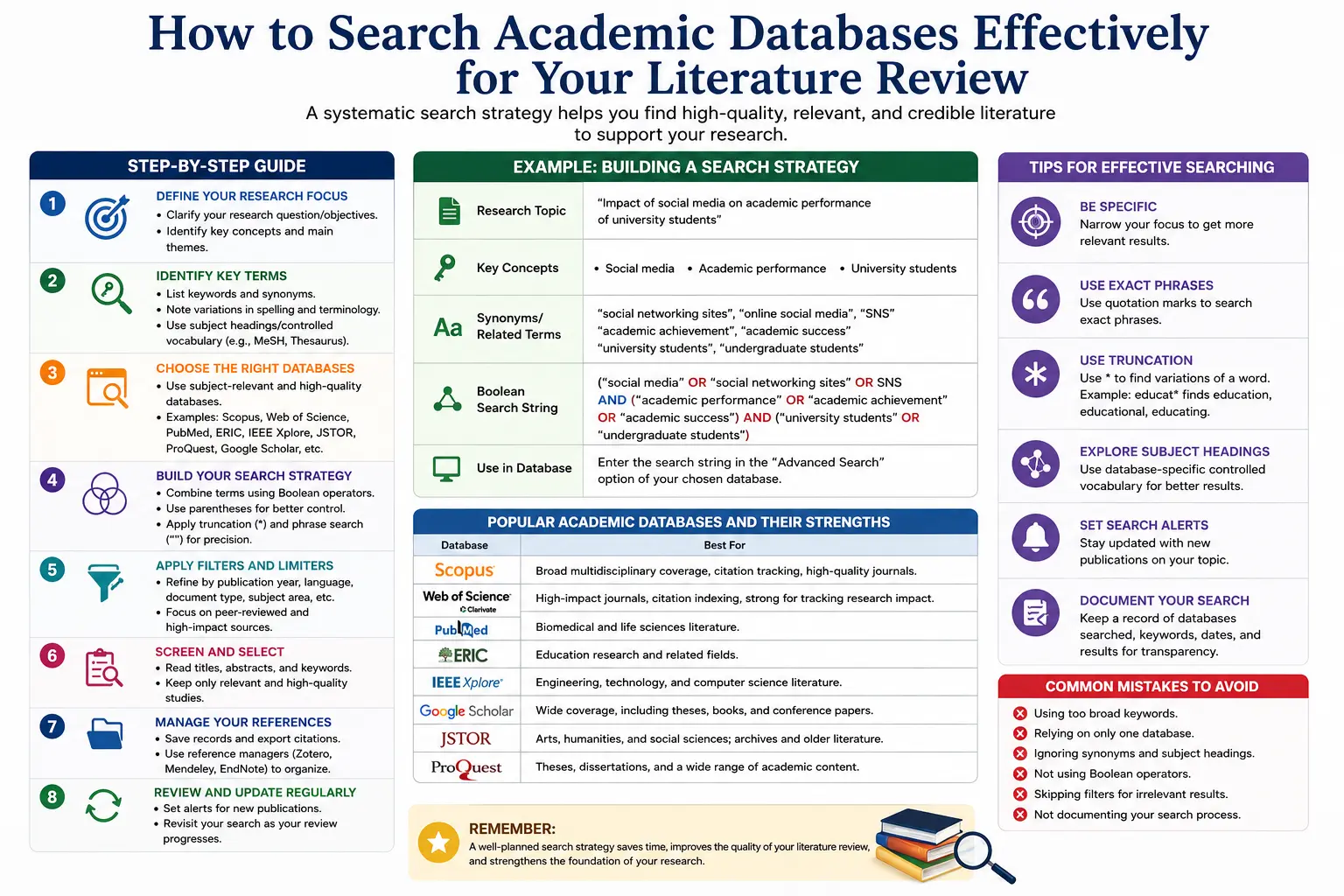
Example: Research question: How does social media use affect academic performance among undergraduate students in India?
Concept blocks:
- Block A: Social media (social media, social networking sites, Facebook, Instagram, WhatsApp)
- Block B: Academic performance (academic achievement, student performance, grades, GPA, learning outcomes)
- Block C: Undergraduate students (college students, university students, higher education students)
- Block D: India (Indian students, South Asia — optional, depending on whether you want to limit geographically)
Generate Synonyms and Alternate Terms
For each concept block, brainstorm synonyms, related terms, abbreviations, and alternate spellings. Databases index what authors wrote, and different authors use different words for the same concept. If you only search for "social media," you will miss papers that use "social networking sites" or "online platforms."
This step is non-negotiable for a thorough literature review.
Step 3: Master Boolean Operators
Boolean operators are the logical connectors that tell a database how to combine your search terms. Mastering them is the single most impactful skill you can develop for database searching.
AND
Narrows your search. Retrieves records that contain all the specified terms.
social media AND academic performance
Use AND to combine your concept blocks. The more AND connectors you use, the fewer results you retrieve — but those results are more precisely targeted.
OR
Broadens your search. Retrieves records that contain any of the specified terms.
social media OR social networking sites OR Facebook OR Instagram
Use OR within each concept block to capture synonyms and alternate terms. OR is your tool for ensuring you do not miss relevant papers because of terminology variation.
NOT
Excludes terms. Retrieves records that contain one term but not another.
depression NOT clinical depression
Use NOT carefully. It can accidentally exclude relevant papers.
Parentheses for Grouping
Combine AND and OR using parentheses to control the logic of your search.
(social media OR social networking sites OR Facebook) AND (academic performance OR student achievement OR grades) AND (undergraduate OR university students)
This is a complete, well-structured Boolean search string. It tells the database: find papers that discuss social media or its equivalents AND academic performance or its equivalents AND involve undergraduate or university students.
Phrase Searching with Quotation Marks
Put quotation marks around multi-word phrases to search for the exact phrase rather than the individual words.
"literature review" retrieves papers containing that exact phrase, not just papers containing the words "literature" and "review" separately.
"mental health" AND "social media" AND adolescents
Step 4: Use Advanced Search Features
Every major database has an advanced search interface. Use it. Basic keyword searches in a single box are for casual browsing, not systematic literature review.
Field Searching
Most databases allow you to specify which part of a record to search. Common field tags include:
- Title (TI) — Searches only the article title. High precision, lower recall.
- Abstract (AB) — Searches the abstract. Good balance of precision and recall.
- Keywords (KW) — Searches author-assigned keywords.
- Subject Headings — Controlled vocabulary terms assigned by database indexers (see below).
A best-practice strategy for literature reviews is to search Title, Abstract, and Keywords simultaneously:
TI,AB,KW(social media AND academic performance)
Subject Headings and Controlled Vocabulary
Beyond keyword searching, most major databases have a controlled vocabulary — a standardized list of subject terms that indexers assign to each paper regardless of the words the authors used.
- PubMed uses MeSH (Medical Subject Headings)
- PsycINFO uses APA Thesaurus terms
- ERIC uses ERIC Thesaurus descriptors
Searching using subject headings dramatically improves recall and precision. Before running your keyword search, look up your topic in the database's thesaurus to identify the official subject heading, then combine subject heading searching with keyword searching for the most comprehensive result.
Truncation and Wildcards
Truncation (usually an asterisk *) retrieves all words that begin with a root:
educat* retrieves education, educator, educators, educational, educating
Wildcards (usually a question mark ?) substitute a single character:
wom?n retrieves woman and women
These tools are especially useful when terminology varies by British and American spelling (behaviour/behavior, analyse/analyze).
Filters and Limiters
After running your search, use filters to refine results:
- Date range — Limit to the last 5, 10, or 20 years depending on your field
- Language — Limit to English, or include Hindi, regional languages as appropriate
- Document type — Limit to peer-reviewed journal articles, or include books, dissertations, conference papers
- Subject area — Narrow to your discipline if the database is multidisciplinary
- Open Access — Filter for freely available full text where institutional access is limited
Step 5: Develop a Systematic Search Strategy
For a PhD literature review — and especially for a formal systematic review — you need a documented, reproducible search strategy. This means recording exactly what you searched, where, and when.
Create a Search Log
Maintain a simple spreadsheet with columns for:
- Database name
- Search string used
- Date of search
- Number of results retrieved
- Filters applied
- Notes
This log serves two purposes: it allows you to reproduce and update your search later, and it provides the documentation required in a systematic review's methods section.
The Iterative Approach
Literature searching is rarely a single event. Expect to run your search multiple times, refine your terms based on what you find, discover new synonyms from papers you read, and revisit databases as new literature is published.
A typical search sequence:
- Run a broad initial search to understand the landscape
- Read titles and abstracts, note relevant terminology
- Refine your search string with new terms
- Run targeted searches in discipline-specific databases
- Use citation tracking to find papers your keyword search missed
Citation Tracking: Forward and Backward
Keyword searching finds papers that match your terms. Citation tracking finds papers that are conceptually related, even if they use different terminology.
Backward citation tracking (reference mining): Read the reference list of a highly relevant paper and identify further sources you should retrieve.
Forward citation tracking: Use Scopus, Web of Science, or Google Scholar to find papers that have cited a key paper since it was published. This is how you find the most recent work building on foundational studies.
Citation tracking is non-negotiable for a thorough literature review. It consistently uncovers important papers that keyword searching alone misses.
Step 6: Manage and Organise What You Find
Finding papers is only half the task. Managing them is equally important.
Use Reference Management Software
Zotero (free) and Mendeley (free, with institutional features) are the most widely used reference managers among Indian researchers. Both allow you to:
- Save papers directly from databases with one click
- Store PDFs alongside citation metadata
- Organise papers into folders by theme or search
- Generate citations and bibliographies in APA, MLA, Harvard, or any other style
- Collaborate with supervisors or co-researchers
Install the browser extension for your chosen reference manager before you begin searching. It saves enormous time.
Screen Systematically
After retrieving results, screen them in stages:
Stage 1 — Title screening: Read titles only. Exclude clearly irrelevant papers.
Stage 2 — Abstract screening: Read abstracts of remaining papers. Exclude those that do not meet your inclusion criteria.
Stage 3 — Full-text screening: Read full papers that pass abstract screening. Make final inclusion/exclusion decisions.
Document your inclusion and exclusion criteria before you begin screening. Criteria might include: peer-reviewed only, published after 2010, studies conducted in school or university settings, English-language publications.
Common Mistakes to Avoid
Relying solely on Google Scholar. Google Scholar is a starting point, not an endpoint. It lacks the precision filtering, controlled vocabulary, and citation analysis features of Scopus and Web of Science.
Using only one or two search strings. Your first search string will almost certainly be imperfect. Plan for iteration.
Ignoring grey literature where relevant. For policy-relevant topics, government reports, NGO publications, and working papers may contain crucial evidence not published in peer-reviewed journals.
Not recording your search strategy. If you cannot reproduce your search, your literature review cannot be called systematic. Even if you are not conducting a formal systematic review, documentation is good practice.
Stopping when you reach saturation too quickly. True saturation in a literature review means you are finding the same papers repeatedly across multiple databases and search strategies — not that you have run one search and found fifty papers.
Final Thoughts
Searching academic databases effectively is one of the most underrated skills in academic research. The difference between a researcher who types keywords into a single database and one who deploys a structured, multi-database, Boolean-powered search strategy with citation tracking is the difference between a partial picture and a genuinely comprehensive literature review.
The strategies in this guide — defining your concepts, building Boolean search strings, using controlled vocabulary, searching multiple databases, tracking citations, and managing results systematically — are the same strategies used by experienced researchers, systematic reviewers, and research librarians worldwide.
Apply them from the very beginning of your literature review process. The time invested in searching properly is always recovered in the clarity, credibility, and completeness of what you write.
Contact ThesisLikho Today
Call / WhatsApp: +91 96438 02216
Visit: ThesisLikho.com