
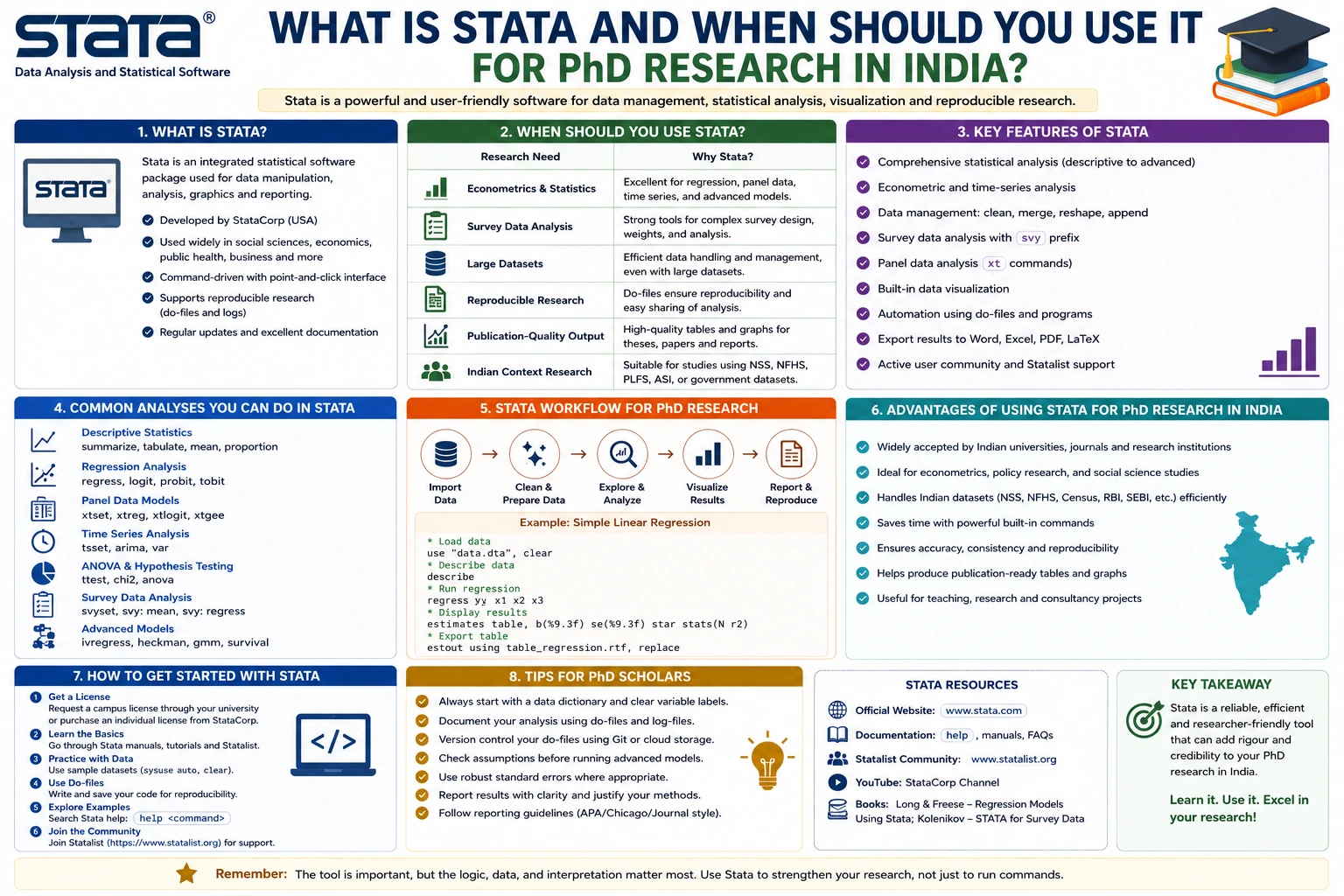
Choosing the right statistical software is one of the most important decisions a PhD scholar makes during the research journey. Whether you're analyzing survey responses, conducting econometric modeling, managing panel data, or performing advanced regression analysis, the software you select directly impacts the efficiency and credibility of your research.
Among the many statistical tools available today, STATA has earned a reputation as one of the most reliable, user-friendly, and powerful software packages for academic and professional research. It is widely used by researchers, universities, government agencies, policy organizations, and international institutions worldwide.
For PhD scholars in India, STATA is especially popular in disciplines such as economics, public health, sociology, management, political science, education, and development studies. Its ability to handle large datasets, perform advanced statistical analyses, and generate publication-ready outputs makes it a preferred choice for doctoral research.
In this comprehensive guide, you'll learn what STATA is, its key features, advantages, limitations, common applications, and when you should consider using it for your PhD research in India.
What Is STATA?
STATA is a comprehensive statistical software package designed for data management, statistical analysis, graphics, and automated reporting. Developed by StataCorp LLC, the software combines an intuitive interface with a powerful command-line system, making it suitable for both beginners and experienced researchers.
Unlike spreadsheet programs such as Microsoft Excel, STATA is built specifically for statistical computing. It allows researchers to clean, organize, analyze, visualize, and interpret data using a wide range of statistical techniques.
Since its launch in 1985, STATA has become one of the most trusted tools in academic research, with thousands of universities and research institutions using it for quantitative analysis.
Why Is STATA Popular Among PhD Scholars?
PhD research often involves large datasets, complex statistical models, and the need for reproducible results. STATA simplifies these tasks by providing a robust environment where researchers can efficiently manage data and perform advanced analyses.
Some reasons why doctoral students prefer STATA include:
- Easy-to-learn interface
- Powerful command-based analysis
- Excellent documentation
- Fast processing of large datasets
- Extensive statistical capabilities
- High-quality graphical outputs
- Reproducible workflows using do-files
- Strong acceptance in academic journals
For many Indian universities, STATA is also recommended for economics, public policy, and social science research because of its reliability and widespread academic use.
Key Features of STATA
STATA offers an extensive range of tools that support every stage of the research process.
1. Data Management
Before performing statistical analysis, researchers must prepare their datasets. STATA provides efficient tools for:
- Importing Excel, CSV, SPSS, and SAS files
- Merging datasets
- Removing duplicates
- Recoding variables
- Creating new variables
- Managing missing values
- Sorting and filtering observations
These capabilities significantly reduce the time required for data cleaning.
2. Descriptive Statistics
STATA makes it easy to summarize data through:
- Mean
- Median
- Mode
- Standard deviation
- Frequency tables
- Percentages
- Cross-tabulations
- Distribution analysis
These descriptive statistics provide the foundation for understanding your dataset before conducting advanced analyses.
3. Regression Analysis
Regression analysis is one of STATA's strongest features.
Researchers can perform:
- Simple linear regression
- Multiple regression
- Logistic regression
- Probit regression
- Poisson regression
- Tobit regression
- Quantile regression
- Instrumental variable regression
These models are commonly used across economics, business, public health, and social sciences.
4. Panel Data Analysis
One of STATA's biggest strengths is handling panel (longitudinal) data.
Researchers can analyze:
- Fixed effects models
- Random effects models
- Dynamic panel models
- Difference-in-differences analysis
These methods are especially useful for studies tracking individuals, organizations, or regions over time.
5. Time Series Analysis
STATA supports advanced forecasting techniques including:
- ARIMA models
- VAR models
- Cointegration tests
- Unit root tests
- Seasonal decomposition
- Forecasting models
These are frequently used in finance, economics, and business research.
6. Survival Analysis
Medical and public health researchers often use STATA for:
- Kaplan-Meier estimation
- Cox proportional hazards models
- Survival curves
- Hazard ratio estimation
These techniques help analyze time-to-event data, such as patient survival or treatment outcomes.
7. Graphical Visualization
Visualizing data helps researchers communicate findings effectively.
STATA offers:
- Histograms
- Scatter plots
- Box plots
- Line charts
- Bar graphs
- Density plots
- Survival curves
Graphs can also be customized for publication-quality figures.
Benefits of Using STATA for PhD Research
Easy to Learn
Unlike some statistical programming languages, STATA provides both menu-driven and command-line interfaces. Beginners can use menus while gradually learning commands for greater flexibility and reproducibility.
Reproducible Research
STATA allows researchers to save commands in do-files, enabling analyses to be rerun and verified. This is particularly valuable when reviewers or supervisors request changes.
Excellent Documentation
The software includes detailed manuals, examples, and an active user community. This makes it easier to troubleshoot issues and learn new techniques.
Reliable Statistical Procedures
STATA is trusted by researchers because its statistical methods are thoroughly tested and widely accepted in peer-reviewed journals.
Efficient Performance
Even large datasets containing millions of observations can be processed efficiently, depending on the version of STATA being used.
When Should You Use STATA for Your PhD Research?
STATA is not always the best choice for every research project. It excels in specific situations.
Use STATA When Your Research Involves Survey Data
Questionnaire-based studies often generate structured datasets that STATA can analyze efficiently.
Examples include:
- Student satisfaction surveys
- Employee engagement studies
- Consumer behavior research
- Healthcare surveys
- Educational assessments
Use STATA for Econometric Analysis
Economics and finance researchers frequently rely on STATA for advanced econometric models.
Suitable analyses include:
- Demand estimation
- Market analysis
- Economic forecasting
- Income inequality studies
- Productivity analysis
Use STATA for Panel Data
If your research tracks the same subjects over multiple time periods, STATA offers specialized tools for longitudinal analysis.
Examples include:
- Company performance over ten years
- Student academic progress
- Household income trends
- State-level economic indicators
Use STATA for Public Health Research
Public health researchers commonly use STATA for epidemiological studies, clinical research, and health policy evaluations.
Typical applications include:
- Disease prevalence studies
- Survival analysis
- Clinical trial data
- Risk factor analysis
- Health service evaluations
Use STATA for Policy Evaluation
Government agencies and think tanks often use STATA to evaluate public programs and policies.
Common methods include:
- Difference-in-differences
- Propensity score matching
- Instrumental variable analysis
- Impact evaluation
Disciplines That Commonly Use STATA in India
STATA is widely adopted across several academic disciplines.
These include:
- Economics
- Public Health
- Management
- Business Administration
- Sociology
- Political Science
- Education
- Agriculture
- Development Studies
- Demography
- Public Policy
- Finance
Many Indian universities recommend STATA for postgraduate dissertations and doctoral research in these fields.
Common Statistical Analyses Performed in STATA
Indian PhD scholars frequently use STATA for:
- Descriptive statistics
- Correlation analysis
- Independent t-tests
- ANOVA
- Chi-square tests
- Linear regression
- Logistic regression
- Multilevel modeling
- Panel regression
- Survival analysis
- Structural equation modeling
- Instrumental variable estimation
- Time series forecasting
Its broad analytical capabilities make it suitable for a wide range of quantitative research projects.
Tips for Using STATA Effectively
To get the most out of STATA during your PhD journey, consider the following best practices:
- Learn Basic Commands: Familiarize yourself with commands like summarize, tabulate, regress, and graph.
- Use Do-Files: Save all commands in do-files to ensure your analyses are reproducible.
- Keep Data Organized: Maintain a clean dataset with consistent variable names and labels.
- Document Every Step: Add comments to your do-files explaining the purpose of each command.
- Validate Your Results: Check assumptions, review diagnostic tests, and verify outputs before interpreting findings.
- Stay Updated: New STATA releases often include additional commands and improved analytical features.
Limitations of STATA
While STATA is a powerful research tool, it has some limitations.
Licensing Cost
STATA is commercial software and requires a paid license, which may be a challenge for some independent researchers. However, many Indian universities provide institutional access.
Limited Machine Learning Features
Although STATA supports several predictive methods, it is not as comprehensive as Python or R for advanced machine learning and artificial intelligence applications.
Fewer Community Extensions Than R
R has a larger ecosystem of user-developed packages, giving it an edge in cutting-edge statistical techniques.
Command Syntax
Although simpler than many programming languages, researchers still need to learn STATA's command syntax to fully utilize its capabilities.
Best Practices for Indian PhD Scholars Using STATA
If you are conducting doctoral research in India, keep these recommendations in mind:
- Confirm with your supervisor or department whether STATA is the preferred software for your discipline.
- Use institutionally licensed versions whenever possible.
- Learn both the graphical interface and command-line syntax.
- Back up your do-files and datasets regularly.
- Report the STATA version used in your methodology chapter to improve reproducibility.
- Include details of your statistical tests and assumptions in your thesis and publications.
Frequently Asked Questions (FAQs)
Is STATA suitable for beginners?
Yes. STATA offers a user-friendly graphical interface alongside a command-line environment, making it accessible to beginners while supporting advanced users.
Is STATA better than SPSS?
For advanced quantitative analysis, econometrics, panel data, and policy evaluation, STATA generally offers more sophisticated capabilities. SPSS may be more suitable for users who primarily need basic statistical analyses with a menu-driven interface.
Can STATA handle large datasets?
Yes. STATA is designed to process large datasets efficiently and is widely used in research involving thousands or even millions of observations, depending on the software edition and system resources.
Which Indian research fields commonly use STATA?
STATA is widely used in economics, finance, management, sociology, public health, political science, education, agriculture, development studies, and public policy.
Do journals accept research analyzed with STATA?
Absolutely. Many leading international and Indian journals publish research conducted using STATA. What matters most is the appropriateness of the statistical methods and the quality of the research, not the software itself.
Conclusion
STATA has established itself as one of the most trusted statistical software packages for academic research, particularly in fields that require rigorous quantitative analysis. Its combination of powerful statistical tools, efficient data management, reproducible workflows, and user-friendly interface makes it an excellent choice for PhD scholars in India.
Whether you are analyzing survey data, building econometric models, working with panel datasets, or evaluating public policies, STATA provides the reliability and flexibility needed for high-quality doctoral research. While it is a paid software and may not offer the same breadth of machine learning capabilities as R or Python, its strengths in statistical analysis and academic acceptance make it a worthwhile investment for many researchers.
Before selecting any statistical software, consider your research objectives, methodology, supervisor's recommendations, and the analytical techniques your study requires. Choosing the right tool early in your PhD journey will help streamline your analysis, improve reproducibility, and strengthen the credibility of your thesis and future publications.
Website: www.thesislikho.com
Call/WhatsApp: +91 96438 02216